

BarTender RFID software, BarTender RFID label printing, RFID label software, RFID printer software, RFID label encoding, RFID printer encoder, RFID label design, EPC encoding, RFID barcode label software, RFID serialization
RFID projects do not depend only on tags, readers, antennas, and printers. Software also plays a critical role, especially when businesses need to design RFID labels, print visual information, encode RFID chips, manage serialized data, connect databases, and control label production workflows.
For many RFID labeling projects, BarTender software is used as a label design, printing, and encoding platform. It helps users create labels that combine text, barcodes, QR codes, graphics, human-readable information, and RFID data in one workflow.
For Syncotek RFID deployments, BarTender should be understood as part of the complete RFID label production process. It does not replace RFID hardware. Instead, it works together with RFID printers, RFID labels, printer drivers, databases, and encoding rules to help businesses create accurate, readable, and trackable RFID labels.
This guide answers practical questions about BarTender software in RFID applications and explains how it fits into inventory management, logistics, manufacturing, asset tracking, and compliance labeling workflows.
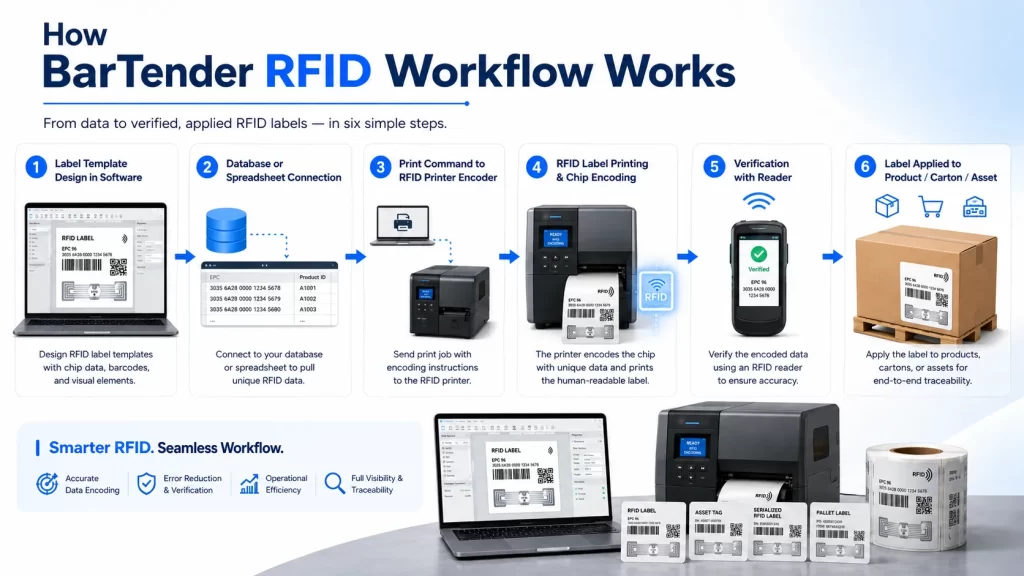
BarTender is label design and printing software used to create and print labels, barcodes, cards, documents, and RFID-enabled labels. In RFID workflows, it can help design the visible label layout and send RFID encoding data to a compatible RFID printer encoder.
A typical RFID label created with BarTender may include:
This makes BarTender useful when businesses need both printed label information and RFID chip encoding in the same production process.
In an RFID system, the physical label and the digital data must match. If the printed barcode says one thing but the RFID chip stores another value, the entire tracking workflow can fail.
BarTender helps manage this relationship by connecting label design, data sources, printer output, and RFID encoding.
For example:
For companies moving from barcode labels to RFID inventory management, this type of software control is important because RFID labels must support both visual and wireless identification.
BarTender is commonly used with RFID printer encoders. An RFID printer encoder prints the visible label and writes data into the RFID inlay inside the label.
A simplified workflow looks like this:
If you need a broader hardware explanation, Syncotek’s RFID printers guide explains RFID printer types, print methods, ribbons, media, inlay position, and calibration.
Yes, BarTender can support RFID encoding when it is used with a compatible RFID printer encoder, proper printer driver, and suitable RFID media.
The RFID printer must be able to encode the type of RFID label being used. The software and printer configuration must also match the RFID frequency, label layout, and inlay position.
BarTender is commonly used for encoding:
For non-printable tags, hard tags, cards, or one-by-one tag writing, a reader-writer may be more suitable. Syncotek’s article on RFID writers explains when to use reader-writers instead of printer encoders.
BarTender is software. The RFID printer is hardware.
| Item | Role |
|---|---|
| BarTender software | Designs labels, manages data, controls print and encode jobs |
| RFID printer encoder | Prints labels and writes data to RFID chips |
| RFID label | Carries printed information and RFID data |
| Printer driver | Allows BarTender to communicate with the printer |
| Database or spreadsheet | Provides variable label data |
| RFID system | Reads and uses the encoded labels after deployment |
BarTender cannot physically print or encode labels by itself. It sends the print and encoding instructions to the RFID printer encoder.
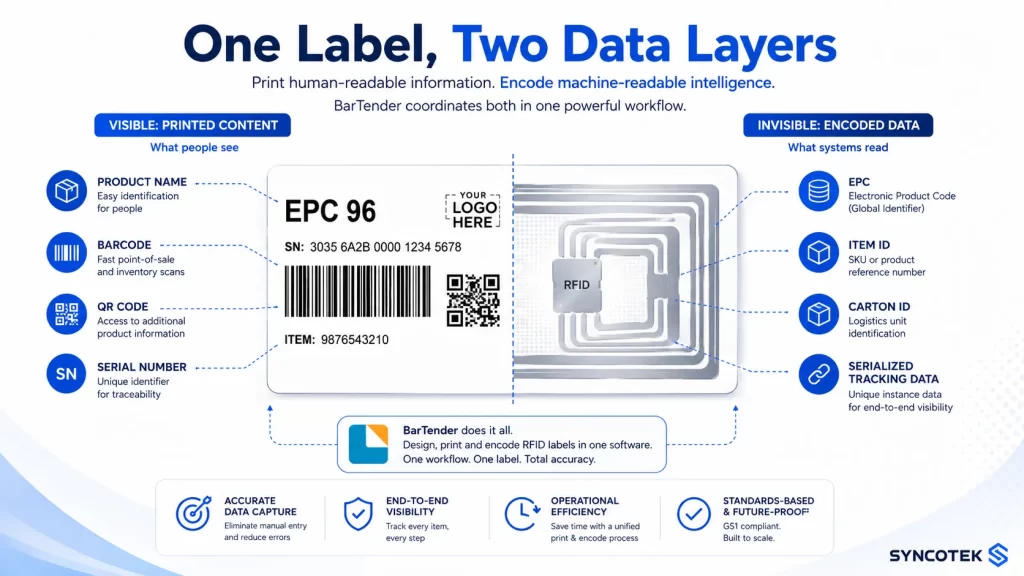
A BarTender RFID label can include both visible and encoded information.
Visible content may include:
RFID chip data may include:
In most RFID systems, the RFID chip stores a unique ID, while the full product or asset information is stored in the database.
Yes. One of the main values of BarTender in RFID workflows is that it can help coordinate printed label content and RFID encoding data.
For example, a label can print:
At the same time, the RFID chip can be encoded with:
This is useful because many businesses still need barcode or visual backup while using RFID for automated data capture.
The correct RFID data format depends on the application, printer, RFID chip, software configuration, and business system.
Common formats include:
For most UHF RFID applications, EPC data is usually stored in EPC memory. However, the data structure should be planned before printing begins.
If you need a detailed explanation of RFID memory banks and encoding formats, Syncotek’s guide on how to program an RFID tag explains EPC memory, TID memory, user memory, Hex, ASCII, capacity, writing, verification, and locking.
Yes. BarTender can be used in workflows where label data comes from a database, spreadsheet, ERP, WMS, MES, or other business system, depending on the edition, configuration, and integration method.
Database-connected RFID printing is useful when each label needs unique data.
Examples include:
This reduces manual data entry and helps prevent duplicate or incorrect labels.
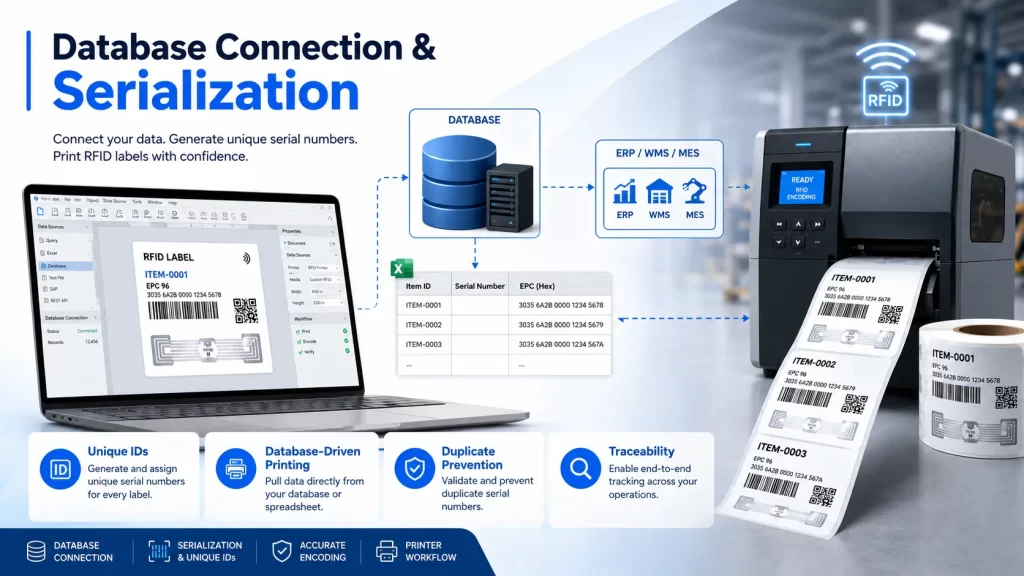
RFID labels are often serialized. This means each label must contain a unique value.
Manual entry is risky when printing many labels. A database-driven workflow helps:
For warehouse, retail, logistics, and manufacturing applications, database connection is often more reliable than manual label creation.
Yes. Serialization is one of the most important functions in RFID label production.
Serialization means that each label receives a unique number or code.
Examples:
| Label Type | Serialized Value |
|---|---|
| Product label | Item-level serial number |
| Carton label | Carton ID |
| Pallet label | Pallet ID |
| Asset label | Asset ID |
| Work-in-process label | Work order or part ID |
| Shipping label | Shipment tracking ID |
Serialization is especially useful when businesses need item-level traceability, inventory accuracy, and automated scanning.
Yes. BarTender can be used to design and print RFID asset labels when the label format is compatible with the printer and RFID media.
RFID asset labels may include:
For metal equipment, IT assets, tools, or machinery, standard RFID labels may not perform well. In those cases, specialized mount on metal RFID tags or on-metal printable RFID labels may be required.
Yes. RFID printing and encoding can support many manufacturing workflows.
Examples include:
In RFID in manufacturing, accurate label printing and encoding can help connect production movement, process tracking, inventory visibility, and traceability records.
Yes. BarTender can support RFID label workflows for warehouses, distribution centers, and logistics operations.
Common labels include:
The key is to ensure that the printed information, encoded RFID data, and warehouse system records match correctly.
Yes. Retail RFID labels often require item-level serialized data, printed product information, barcode backup, and RFID encoding.
BarTender can help create labels for:
For retail RFID labeling, label size, inlay position, printer calibration, and serialized data structure must be carefully managed.
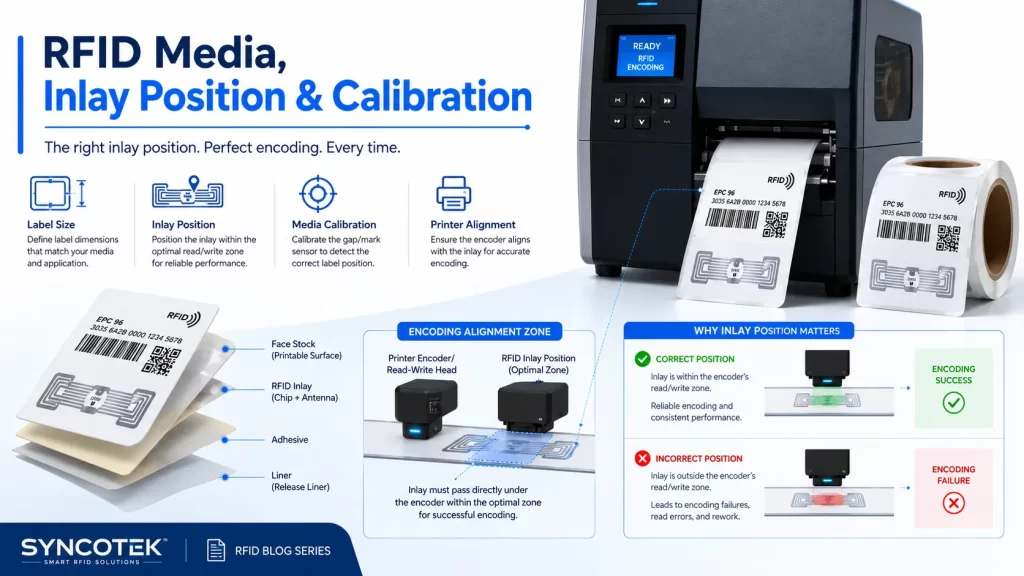
BarTender does not determine RFID media compatibility alone. Media compatibility depends mainly on the RFID printer, label size, inlay location, thickness, roll format, and material.
Common RFID media types include:
Before printing at scale, the RFID label should be tested with the actual printer, ribbon, driver, and BarTender template.
For label structure and format differences, review Syncotek’s guide on RFID inlays, tags, and labels.
In RFID printing, inlay position is critical. The printer’s RFID encoder must align with the RFID inlay inside the label.
If the inlay is positioned incorrectly, the printer may:
This is why RFID label selection, printer configuration, and BarTender template setup should be tested together.
RFID encoding usually requires the correct printer driver and printer configuration. If the printer driver does not support RFID encoding features, the RFID encoder options may not appear or may not work properly.
Before deployment, confirm:
A good deployment starts with confirming that the software, driver, printer, and RFID label all support the same workflow.
A basic RFID label workflow may include the following steps:
Testing one label before batch printing is important. RFID media can be more expensive than standard barcode labels, so mistakes can create unnecessary waste.
After printing and encoding, the RFID label should be verified.
Verification can confirm:
Some printer workflows can detect failed labels. However, project teams should still test sample labels with the actual RFID reader setup used in the final application.
This may happen if the correct printer driver is not installed, the selected printer does not support RFID encoding, or the document is not configured for an RFID printer.
Possible causes include:
This can happen when the label template, database field, serialization rule, or RFID encoding object uses the wrong data source.
Possible causes include:
This means the visual printing is working, but RFID encoding or tag performance may have failed. The RFID inlay, encoding value, printer setup, and final application surface should all be checked.
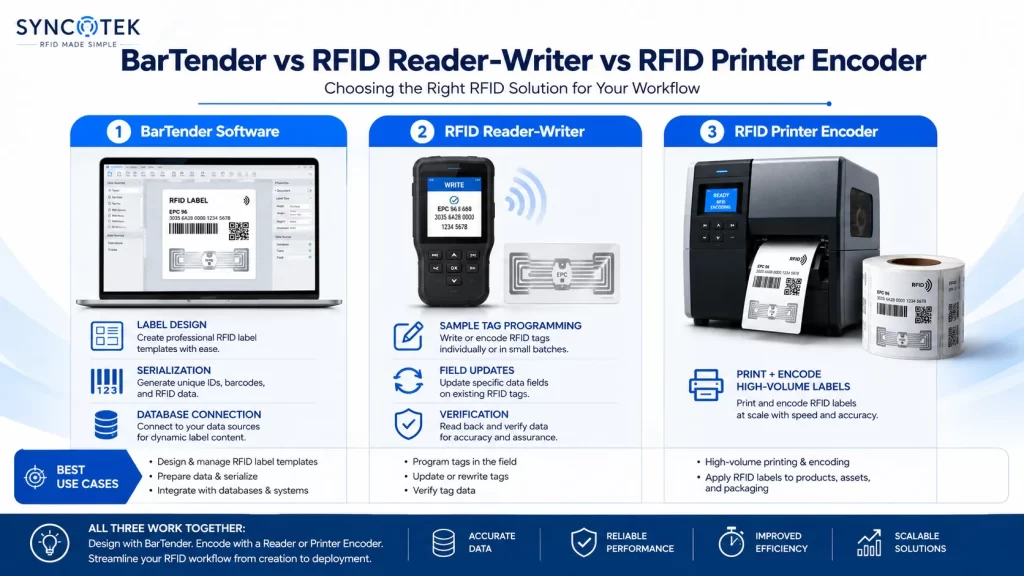
BarTender with an RFID printer encoder is best for printable label production. RFID reader-writers are better for non-printing tag encoding or field updates.
| Workflow | Better Choice |
|---|---|
| Print and encode RFID labels | BarTender + RFID printer encoder |
| Encode hundreds or thousands of labels | BarTender + RFID printer encoder |
| Design barcode + RFID label layout | BarTender |
| Program a hard RFID tag manually | RFID reader-writer |
| Update an RFID tag in the field | Handheld RFID reader-writer |
| Test RFID memory on sample tags | Desktop reader-writer |
| Encode access cards | Reader-writer or card printer system |
The best choice depends on tag type, label volume, print requirements, and workflow control.
Not always.
BarTender is mainly used for label design, printing, encoding, serialization, and labeling workflow control. RFID middleware or RFID software is usually used after deployment to collect RFID reader data, filter reads, connect with business systems, and manage operational events.
A complete RFID system may include:
BarTender helps create the RFID label. The RFID system later reads and uses that label.
Before starting RFID label production, prepare the following:
Planning these details reduces wasted labels and deployment delays.
To improve reliability, follow these practices:
A reliable RFID label workflow depends on software, printer, media, data, and process control working together.
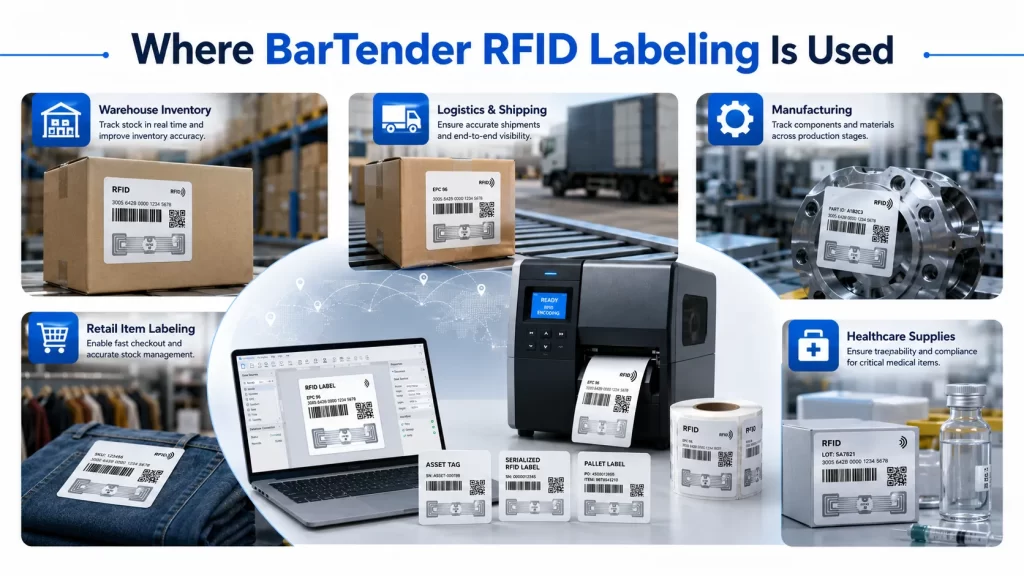
BarTender can help create RFID labels for products, cartons, bins, pallets, and warehouse stock. These labels can support automated inventory tracking and faster cycle counts.
BarTender can support production labels, work order labels, WIP labels, tool labels, and finished goods identification.
RFID asset labels can be printed and encoded with unique asset IDs for tools, machines, IT equipment, containers, and office assets.
Shipping labels, carton labels, and pallet labels can be printed and encoded for supply chain visibility.
Item-level RFID labels can support stock visibility, replenishment, and omnichannel order fulfillment.
RFID labels can support medical supplies, lab samples, equipment, documents, and controlled inventory workflows.
Before printing RFID labels, confirm:
BarTender software can be an important part of RFID label printing and encoding workflows. It helps businesses design labels, print barcodes and text, encode RFID chips, manage serialized data, connect with databases, and support repeatable label production.
However, successful RFID labeling is not only about software. The RFID printer encoder, label media, inlay position, printer driver, data format, verification process, and final application environment must all work together.
For businesses using RFID labels in inventory management, logistics, manufacturing, retail, healthcare, or asset tracking, BarTender can help create a more controlled and scalable label production workflow when paired with suitable RFID hardware and proper process planning.
BarTender is used to design and print labels, barcodes, cards, and RFID-enabled labels. In RFID workflows, it can help print visible label information and encode RFID data through a compatible RFID printer encoder.
Yes. BarTender can support RFID label encoding when used with a compatible RFID printer encoder, correct printer driver, and suitable RFID label media.
Yes. BarTender can work with RFID printer encoders when the printer, driver, media, and document settings support RFID encoding.
Yes. A label can include printed text, barcode, QR code, and RFID encoded data in one workflow.
Common encoded data includes EPC, item ID, carton ID, pallet ID, asset ID, serial number, or other tracking values depending on the RFID chip and application.
The RFID printer encoder must align with the RFID inlay inside the label. If the inlay position is not compatible, encoding may fail or become unreliable.
No. BarTender is mainly used for label design, printing, and encoding. A complete RFID system also needs tags, readers, antennas, software, and business system integration.
Use BarTender with an RFID printer encoder when you need printed RFID labels. Use an RFID reader-writer when you need to program or update tags without printing.
Need RFID Labels, Printers, Readers, or System Components for Your RFID Workflow?
Syncotek provides RFID tags, labels, readers, antennas, and related system components for inventory management, logistics, manufacturing, retail, healthcare, asset tracking, and industrial identification applications.
Whether you are planning RFID label printing, EPC encoding, asset label production, or a complete RFID tracking system, Syncotek can help you evaluate suitable RFID components based on your label type, printer workflow, read distance, environment, and deployment goals.
 Knowledge
When companies start working with RFID, they often search for a dedicated RFID writer. The goal is usually simple: write data to RFID tags so the tags can identify products, assets, cartons, tools, or inventory items in a digital tracking system. In real RFID projects, however, the term “RFID writer” can be confusing. Many modern RFID […]
READ MORE Knowledge
A passive RFID tag is the most common RFID tag type in the world. It has no battery. Instead, it is powered by the electromagnetic field generated by an RFID reader. Passive tags are the foundation of RAIN UHF RFID item labeling (retail, logistics), HF/NFC access cards and smart labels, and many LF identification systems. This guide explains what passive tags are, how they work, the differences […]
READ MORE Knowledge
In an RFID system, most attention is usually placed on tags, readers, and antennas. However, cables, connectors, and adapters also play an important role in system performance. A well-selected RFID antenna cable helps transfer RF energy from the reader to the antenna with lower loss, while the right connector ensures a secure and compatible connection […]
READ MORE Knowledge
The RFID system auto-identifies vehicles' weight, calculates net weight, and provides real-time monitoring for optimized efficiency.
READ MORE Knowledge
An RFID tag may look like a simple adhesive label, plastic block, textile patch, card, or small industrial component. Inside, however, several electrical and mechanical elements work together to receive radio-frequency energy, process commands, store data, and communicate with an RFID reader. At its most basic level, a passive RFID tag contains: RFID Chip + […]
READ MOREIf you are interested in our services or need customized solutions, please feel free to contact us.