
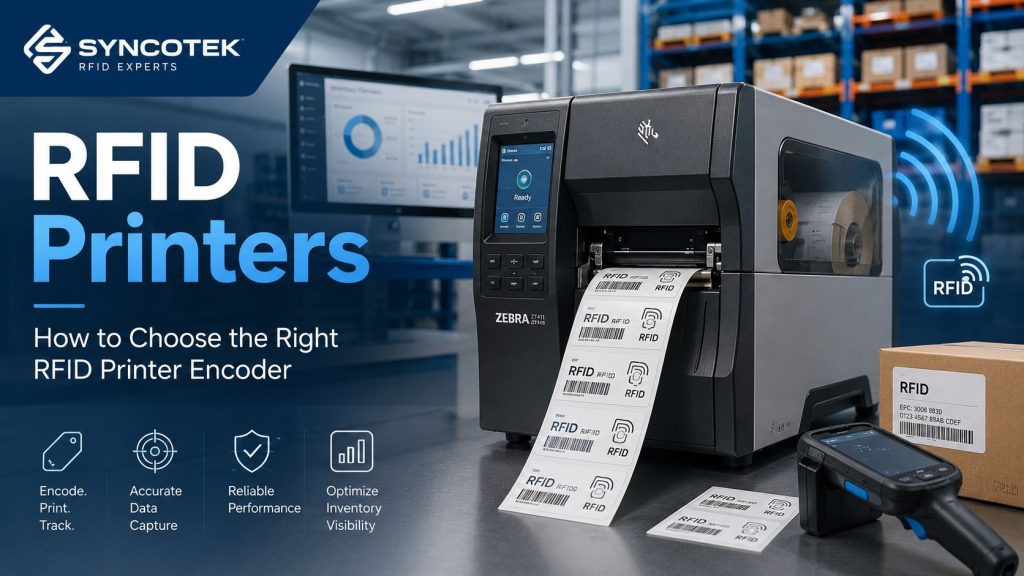
RFID printers play an important role in RFID deployment because they combine two tasks in one workflow: printing visible information on a label and encoding digital data into the RFID inlay inside the label.
For many businesses, RFID printing is the bridge between traditional barcode labeling and automated RFID identification. A properly selected RFID printer can print human-readable text, barcodes, QR codes, logos, serial numbers, and product information while also writing EPC or other data into the RFID chip.
This is especially useful for warehouse inventory, retail item tagging, logistics labels, manufacturing tracking, asset identification, healthcare supplies, and compliance labeling.
Unlike a standard barcode printer, an RFID printer includes an RFID encoder. This encoder communicates with the RFID inlay during printing and writes data to the tag. If the tag is encoded successfully, it can later be read by RFID readers in a warehouse, factory, store, or logistics process.
For Syncotek RFID deployments, the RFID printer should not be selected as a standalone machine. It should be matched with the RFID labels, inlay position, ribbon, software, print volume, encoding requirements, and the complete RFID products used in the system.
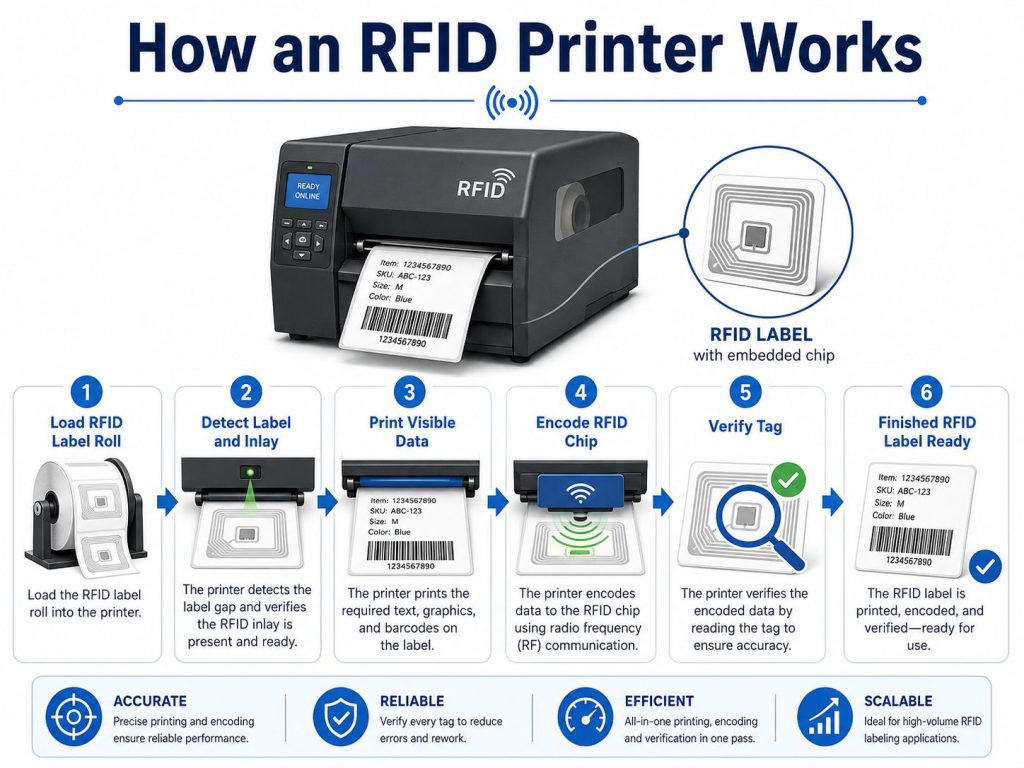
An RFID printer is a printer encoder designed to print and encode RFID labels or tags. The printer prints visible information on the label surface while its built-in RFID module writes data into the RFID chip embedded inside the label.
A typical RFID printing workflow includes:
This process helps businesses create RFID labels in-house instead of manually encoding tags one by one.
RFID printers are valuable because RFID labels usually need both visual identification and electronic identification.
A printed label may show:
The RFID chip may store:
When both parts are created together, the label can support manual identification, barcode backup, and automated RFID reading in one format.
For businesses upgrading from barcode workflows to RFID inventory management, RFID printers help create labels that support both traditional scanning and RFID-based automation.
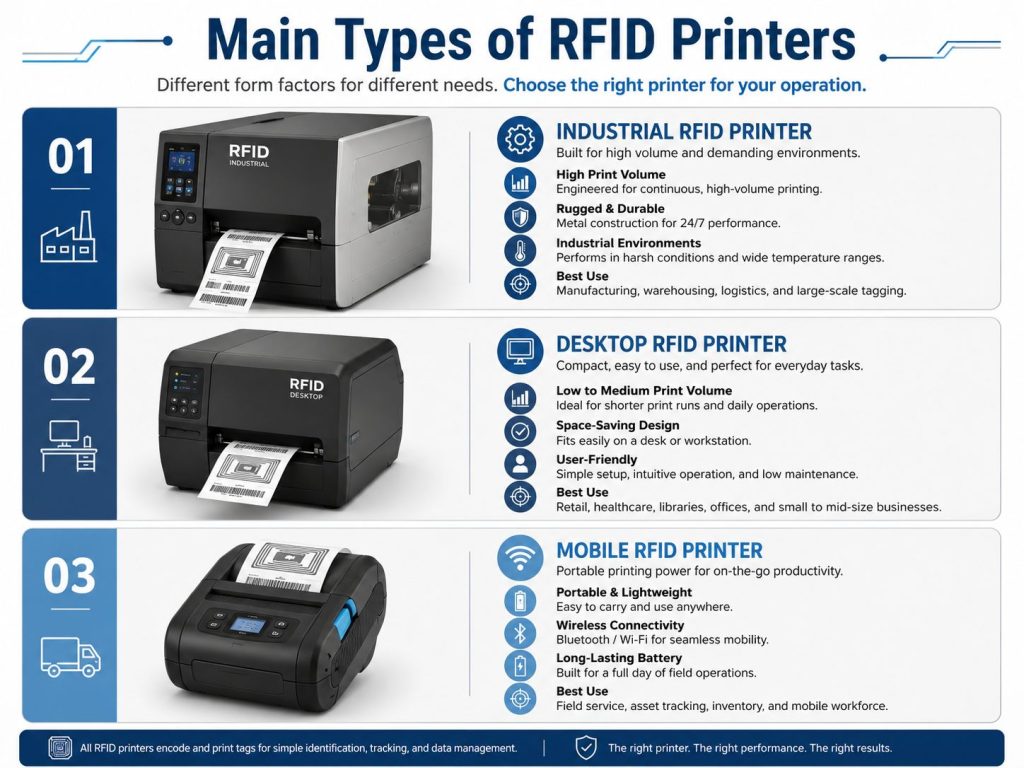
RFID printers are usually selected based on usage environment, print volume, media type, and mobility requirements.
Industrial RFID printers are designed for high-volume and demanding environments. They are usually used in factories, warehouses, distribution centers, logistics operations, and production facilities.
If a business needs to print thousands of RFID labels per day, an industrial RFID printer is usually the best choice.
Desktop RFID printers are compact and suitable for lower-volume or mid-volume applications. They are commonly used in office-like environments, small warehouses, laboratories, healthcare facilities, retail backrooms, and pilot projects.
Desktop RFID printers are a good choice when the business does not need continuous high-volume printing.
Mobile RFID printers are designed for point-of-application printing. Instead of printing labels at a fixed station, workers can print and encode labels near the item, shelf, pallet, asset, or field location.
Mobile RFID printers usually have smaller media capacity and may require specialized media, but they can improve workflow efficiency when labeling needs to happen close to the item.
RFID printers must match the RFID technology used by the labels or tags.
UHF RFID printers are the most common type for warehouse, logistics, retail, manufacturing, and inventory applications. They are typically used for passive UHF RFID labels and tags.
If your project uses UHF RFID readers and antennas, the printer should support the same UHF RFID label format.
HF and NFC printers are used for applications based on 13.56 MHz technology. They may be used for smart cards, authentication, library systems, ticketing, healthcare, product interaction, or NFC-based labels.
SATO’s RFID configuration guide shows that some printer models can support UHF or HF/NFC options depending on the installed RFID module, and that the correct printer option must be selected according to the required standard and inlay type.
Before choosing a printer, confirm whether the project uses UHF, HF, NFC, or another RFID format.
Some RFID labels and tags require specialized printer configurations.
Standard RFID label printers may not handle thick or non-roll media well. On-metal RFID labels are a good example. Some on-metal tags are thicker than normal labels and may require a printer designed for special media feeding, antenna position, and RFID calibration.
For metal asset tracking applications, it is important to understand both printer compatibility and mount on metal RFID tags before selecting the printing workflow.
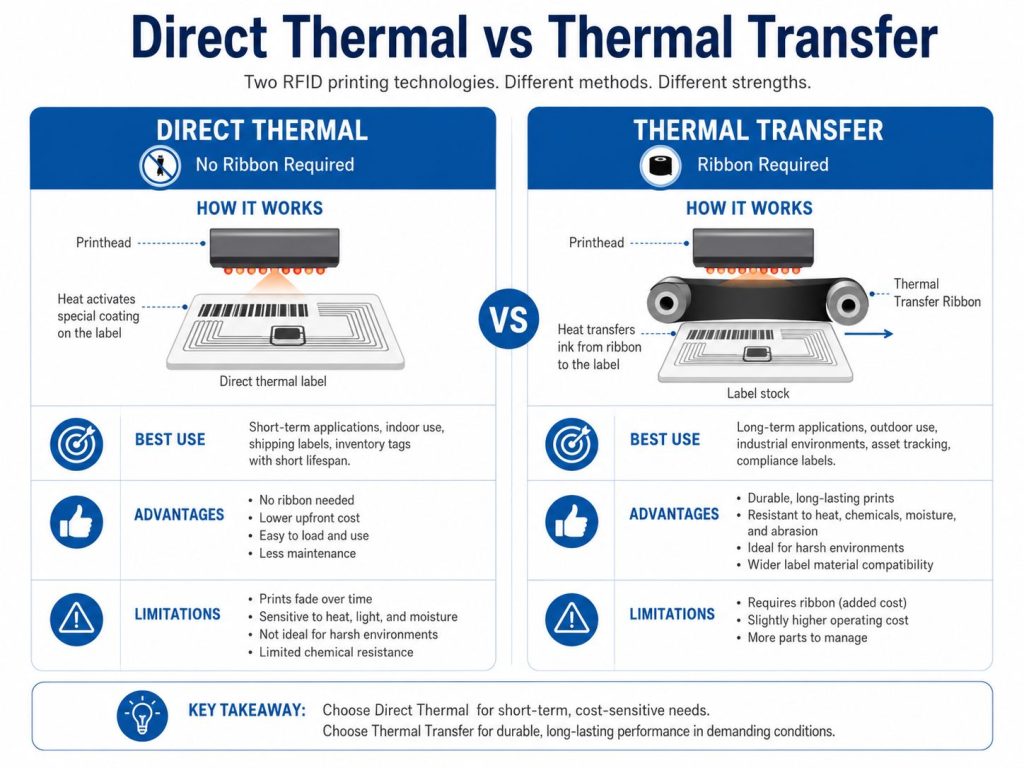
RFID printers may use direct thermal or thermal transfer printing. The right method depends on label lifespan, environment, durability, and cost.
Direct thermal printing uses heat-sensitive label material. The printhead applies heat directly to the label surface, creating the printed image.
Direct thermal printing can be useful for temporary labels, but it is usually not the best choice for RFID labels that need long-term readability.
Thermal transfer printing uses a ribbon. The printhead heats the ribbon and transfers ink onto the label surface.
For most RFID label printing projects, thermal transfer is the safer choice because RFID labels are often used for inventory, logistics, asset tracking, and industrial workflows where printed information needs to remain readable.
If the printer uses thermal transfer printing, ribbon selection becomes important.
The ribbon should match the label face stock, print durability requirement, and operating environment.
Wax ribbon is commonly used with paper labels.
Wax-resin ribbon provides a balance between cost and durability.
Resin ribbon is used when stronger durability is required.
For RFID projects in harsh environments, ribbon selection should be tested together with the actual label material.
RFID printer media must be compatible with both the printing system and the RFID encoder.
The most common RFID printer media includes RFID labels and wet inlays. Hard tags are usually not printed in standard RFID label printers because they are thick, rigid, or not supplied on a roll.
For a deeper explanation of the difference between inlays, labels, and tags, see our guide on RFID inlays, tags, and labels.
Before choosing an RFID printer, check the supported media size.
Important media dimensions include:
If the label is too wide, too thick, or supplied on a roll that does not fit the printer, it may not run correctly.
RFID printers need to detect where one label ends and the next label begins.
Common media separation methods include:
If the printer is not calibrated properly for the media separation type, it may print between labels or encode the wrong inlay.
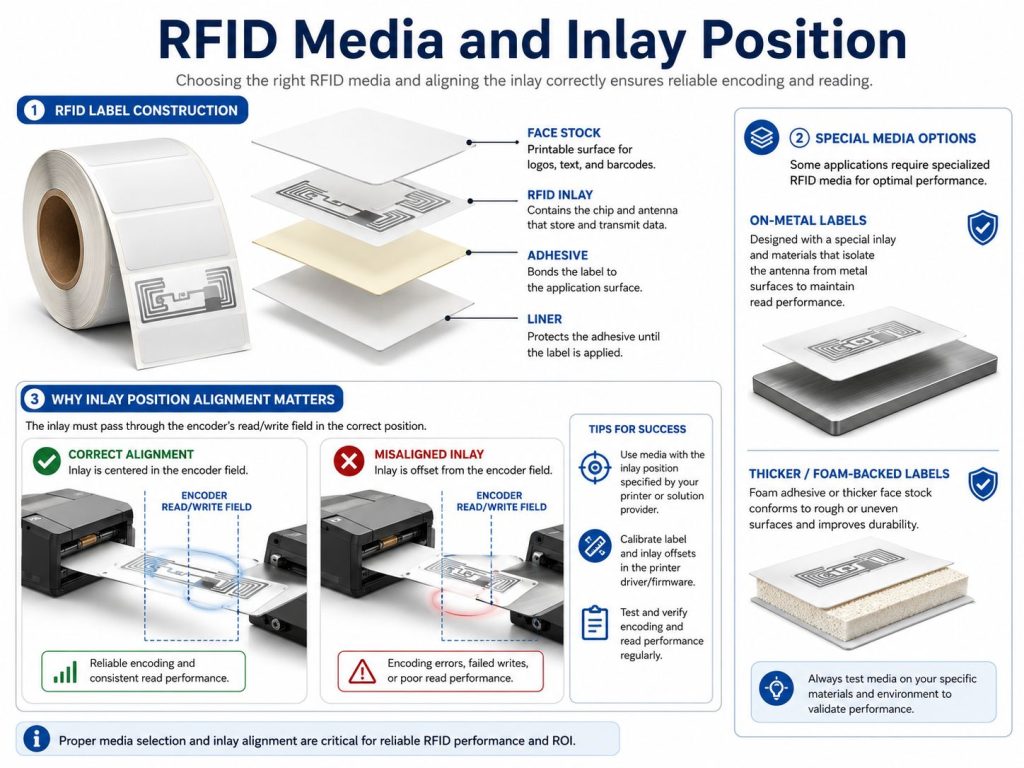
Inlay position is one of the most important factors in RFID printing.
The printer’s RFID encoder must align with the inlay inside the label. If the inlay is in the wrong position, the printer may fail to encode the tag or may encode the wrong tag.
This is why RFID label selection and printer selection should happen together. SATO’s configuration guidance highlights selecting tested inlays and setting printer parameters before confirming print and encode operation, while Zebra’s documentation also treats RFID calibration as a required setup step for reliable media handling and encoding.
On-metal RFID labels and foam-backed tags may require special handling. They are usually thicker than standard RFID labels and may need a printer with a suitable media path, antenna position, pressure setting, and calibration function.
TSC Printronix materials note that on-metal RFID printing requires attention to media thickness, printer antenna location, inlay placement, print/encoding sequence, and feed behavior.
For this reason, always test on-metal labels with the actual printer before mass production.
Check whether the printer supports UHF, HF, NFC, or another RFID format.
A UHF RFID printer is not automatically suitable for NFC labels, and an HF/NFC printer is not automatically suitable for UHF logistics labels.
DPI affects print clarity.
Higher DPI usually costs more, so select it based on actual label content.
Printer width must match label width. Many RFID printers are designed around 4-inch or 6-inch print widths.
If your labels are small, a 4-inch printer may be enough. If you need larger pallet labels or wide-format labels, a wider printer may be required.
Print speed matters in high-volume environments, but speed should not be evaluated alone.
Fast printing is only useful if the printer can also encode reliably. If the printer prints quickly but has frequent encoding failures, the workflow will still be inefficient.
Common RFID printer connection options include:
For networked production environments, Ethernet or Wi-Fi may be preferred. For a single workstation, USB may be enough.
Check whether the printer will be used in:
Industrial environments may require a more durable printer and better cleaning routines.
Desktop and industrial printers usually use AC power. Mobile RFID printers rely on rechargeable batteries.
For mobile applications, battery life, charging cradle, spare batteries, and media capacity should be reviewed before deployment.
RFID printer software helps users design labels, import data, encode RFID chips, manage serial numbers, and send print jobs to the printer.
SATO’s retail RFID solution notes that cloud-based printing and encoding can support multi-site operation, serial number control, print/encode logs, and traceability.
For basic applications, standard label design software may be enough. For automated production, custom integration may be required.
RFID printers require proper calibration and regular maintenance.
RFID calibration helps the printer locate the RFID inlay and determine the best encoding position and power setting.
If RFID calibration is not done correctly, the printer may:
Media calibration helps the printer detect label size, gap, black mark, notch, and print position.
Both RFID calibration and media calibration are important when changing label rolls or switching to a new tag type.
Dust, adhesive residue, ribbon particles, and label debris can affect print quality and printer reliability.
Regular cleaning helps protect:
For factories, warehouses, and dusty environments, cleaning should be scheduled more frequently.
RFID printer operation includes recurring costs such as:
A lower-cost printer may not always reduce total operating cost if it causes more waste, slower operation, or media compatibility issues.
Start with the actual use case.
Examples include:
The application determines print volume, media type, durability, and software requirements.
Make sure the printer supports the RFID labels you plan to use.
Check whether the project uses:
Choose the printer type based on volume and environment.
| Printer Type | Best Use |
|---|---|
| Desktop RFID printer | Low to medium volume, office or backroom use |
| Industrial RFID printer | High volume, warehouse, factory, distribution center |
| Mobile RFID printer | Field labeling, warehouse floor, yard operations |
| Specialized RFID printer | Cards, badges, thick labels, on-metal labels |
Confirm:
Media mismatch is one of the most common causes of RFID printer problems.
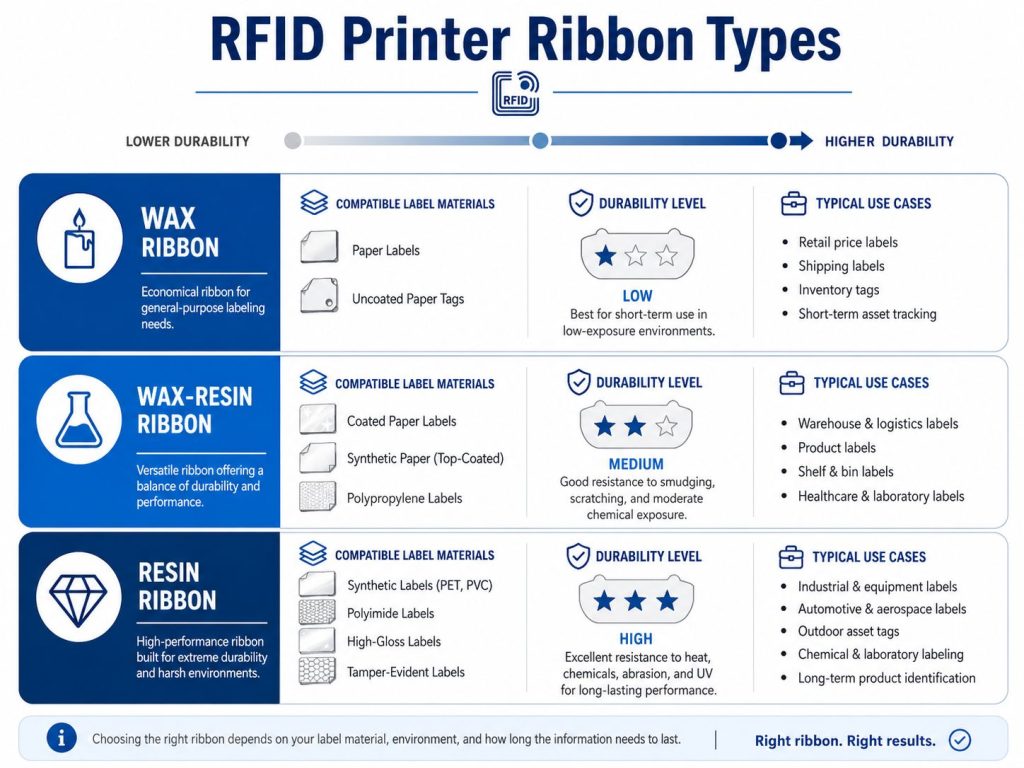
Match ribbon to label material and durability needs.
| Ribbon Type | Best For |
|---|---|
| Wax | Paper labels, lower-cost indoor use |
| Wax-resin | Coated paper and some synthetic labels |
| Resin | Synthetic labels, harsh environments, high durability |
Make sure the printer can work with your label design, encoding data, and business system.
For automated workflows, confirm whether the printer supports APIs, database integration, ERP connection, or WMS integration.
Before buying labels or printers in large quantities, test:
Testing reduces wasted labels and avoids deployment delays.
The RFID label and printer must work together. If the inlay position, label thickness, or roll size does not match the printer, encoding problems may occur.
UHF, HF, and NFC labels require compatible printer encoders. Do not assume all RFID printers support all RFID formats.
Poor ribbon selection can cause smudging, weak print durability, poor barcode quality, or short label life.
Incorrect calibration can waste labels and cause print or encode errors.
Foam-backed labels, on-metal tags, and other thick media may need specialized printer settings or hardware.
Speed is useful, but reliable encoding is more important. A printer that produces failed tags quickly is not a good solution.
Dirty printheads, worn rollers, and debris inside the printer can reduce print quality and cause downtime.
RFID printers are used to print and encode labels for cartons, pallets, bins, shipping units, and warehouse inventory.
RFID printers help create item-level labels for apparel, footwear, accessories, electronics, and retail stock visibility.
In RFID in manufacturing, printers can create labels for WIP tracking, tools, components, finished goods, and production records.
RFID labels can be used for medical supplies, lab samples, equipment, documents, and inventory control.
RFID printers can produce asset labels for IT equipment, office assets, machines, containers, tools, and reusable items.
Some supply chains require RFID-enabled labels for shipment or item-level compliance. RFID printers allow businesses to print and encode these labels in-house.
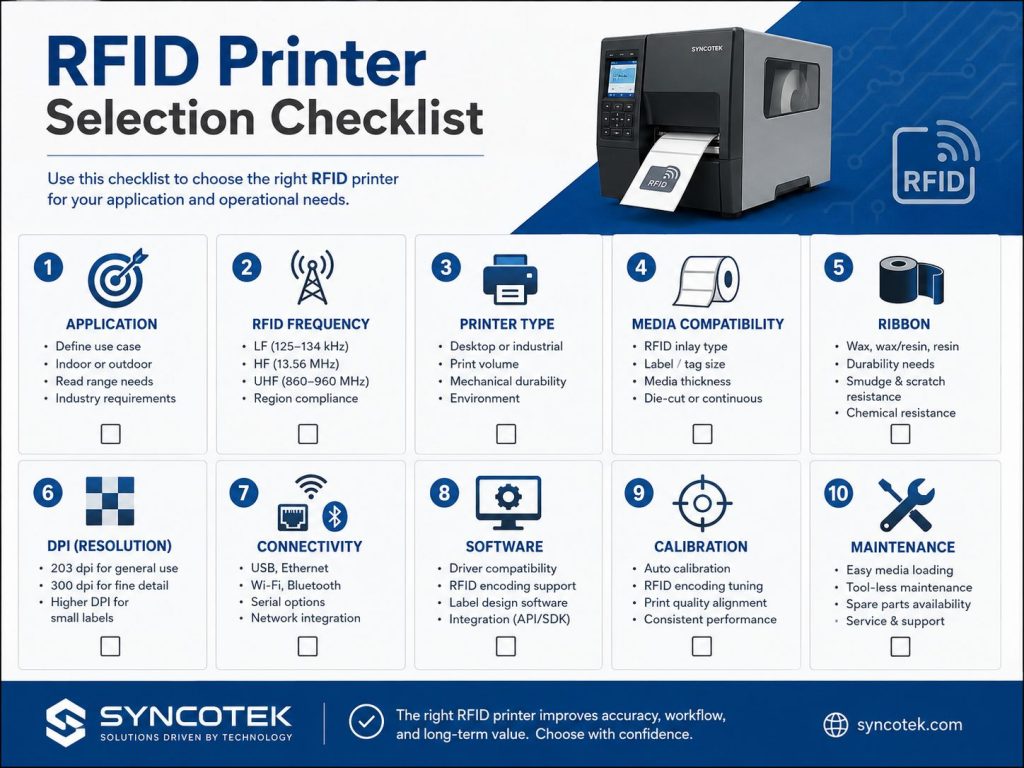
Before selecting an RFID printer, confirm:
RFID printers are essential for businesses that need to create RFID labels and tags in-house. They allow companies to print visible label information while encoding RFID data into the chip, making them useful for inventory, logistics, manufacturing, retail, healthcare, asset tracking, and compliance workflows.
The right RFID printer depends on more than print speed or price. Businesses should evaluate printer type, RFID frequency, print method, ribbon, media size, label thickness, inlay position, DPI, software, calibration, and maintenance requirements.
A successful RFID printing workflow starts with matching the printer, media, ribbon, software, and application environment as one complete system.
An RFID printer is a printer encoder that prints visible information on RFID labels and writes digital data into the RFID chip embedded inside the label.
A barcode printer only prints visible barcodes and text. An RFID printer prints visible information and also encodes RFID data into the label’s RFID inlay.
Yes, RFID printers can be used to encode RFID labels even if printed information is not required. However, most applications use both printing and encoding together.
The main types are desktop RFID printers, industrial RFID printers, mobile RFID printers, and specialized RFID printers for special media such as cards, badges, or on-metal labels.
Thermal transfer printing is often preferred for long-life RFID labels because it provides better durability than direct thermal printing.
Wax ribbon is suitable for paper labels, wax-resin ribbon is suitable for coated paper and some synthetic labels, and resin ribbon is suitable for synthetic or durable labels.
No. The printer must support the label size, inlay position, thickness, roll size, media separation type, and RFID frequency.
Calibration helps the printer detect label size, print position, and RFID inlay position. Without proper calibration, printing or encoding may fail.
Need Help Choosing RFID Printers, Labels, or System Components?
Syncotek provides RFID hardware and identification solutions for inventory management, logistics, manufacturing, retail, asset tracking, and industrial data capture applications.
Whether you need RFID labels, readers, antennas, printer-compatible tags, or complete system components, Syncotek can help you evaluate a suitable RFID setup based on your label type, read range, printing workflow, and deployment environment.
 Case Show
Cloud printing is a printing technology based on cloud services, which can be well matched with Internet applications.
READ MORE Company Events
Holiday Notice for Chinese New Year 2024
READ MORE Knowledge
Manufacturing operations depend on accuracy, timing, and visibility. Materials, tools, fixtures, machines, work orders, semi-finished goods, and finished products move through many production stages every day. When these movements are recorded manually, manufacturers often face delayed updates, inventory errors, missing tools, unclear production status, and limited visibility across the shop floor. RFID technology helps manufacturers […]
READ MORE Knowledge
A production manager may know that Work Order WO-1026 is scheduled to finish today. But that does not necessarily answer: Where is the order physically located? Has machining actually started? Did it complete inspection? Has it been waiting between operations for four hours? Was a required production step skipped? Did it enter rework? Which workstation […]
READ MORE Knowledge
What are LLRP, ALE, and EPCIS (in one minute)? These three GS1/EPCglobal standards cover different layers of an RFID solution: LLRP (Low Level Reader Protocol): a low-level protocol between software and an RFID reader that provides fine control of a single reader. ALE (Application Level Events): a standard interface for applications to obtain filtered, consolidated RFID capture data (i.e., […]
READ MOREIf you are interested in our services or need customized solutions, please feel free to contact us.