

A production manager may know that Work Order WO-1026 is scheduled to finish today.
But that does not necessarily answer:
These gaps are common when production status still depends on:
RFID work-in-progress tracking connects the physical WIP flow with digital manufacturing systems.
A typical architecture is:
WIP Item / Work Order / Carrier
→ RFID Tag
→ Workstation Reader
→ Middleware / Edge Layer
→ MES
→ Production Status / Alert / Analytics
The important idea is:
RFID WIP tracking is not simply about locating parts. It converts physical movement through production into digital process events.
The RFID hardware identifies what arrived at a location.
The MES determines what that event means to the production process.
Work in progress, usually abbreviated WIP, refers to products, components, assemblies or production orders that have entered manufacturing but are not yet finished goods.
A simplified manufacturing flow is:
Raw Material
→ WIP
→ Finished Product
Depending on the factory, WIP may include:
WIP tracking answers questions such as:
Which order is this?
Which operation has it completed?
Which workstation currently has it?
When did it arrive?
How long has it been waiting?
Where should it go next?
Modern commercial RFID WIP systems are already used to provide visibility into the location, status and priority of work orders across production floors. Impinj's Xemelgo WIP solution, for example, uses tagged job travelers, fixed readers at zones and transition points, and handheld readers for locating orders.
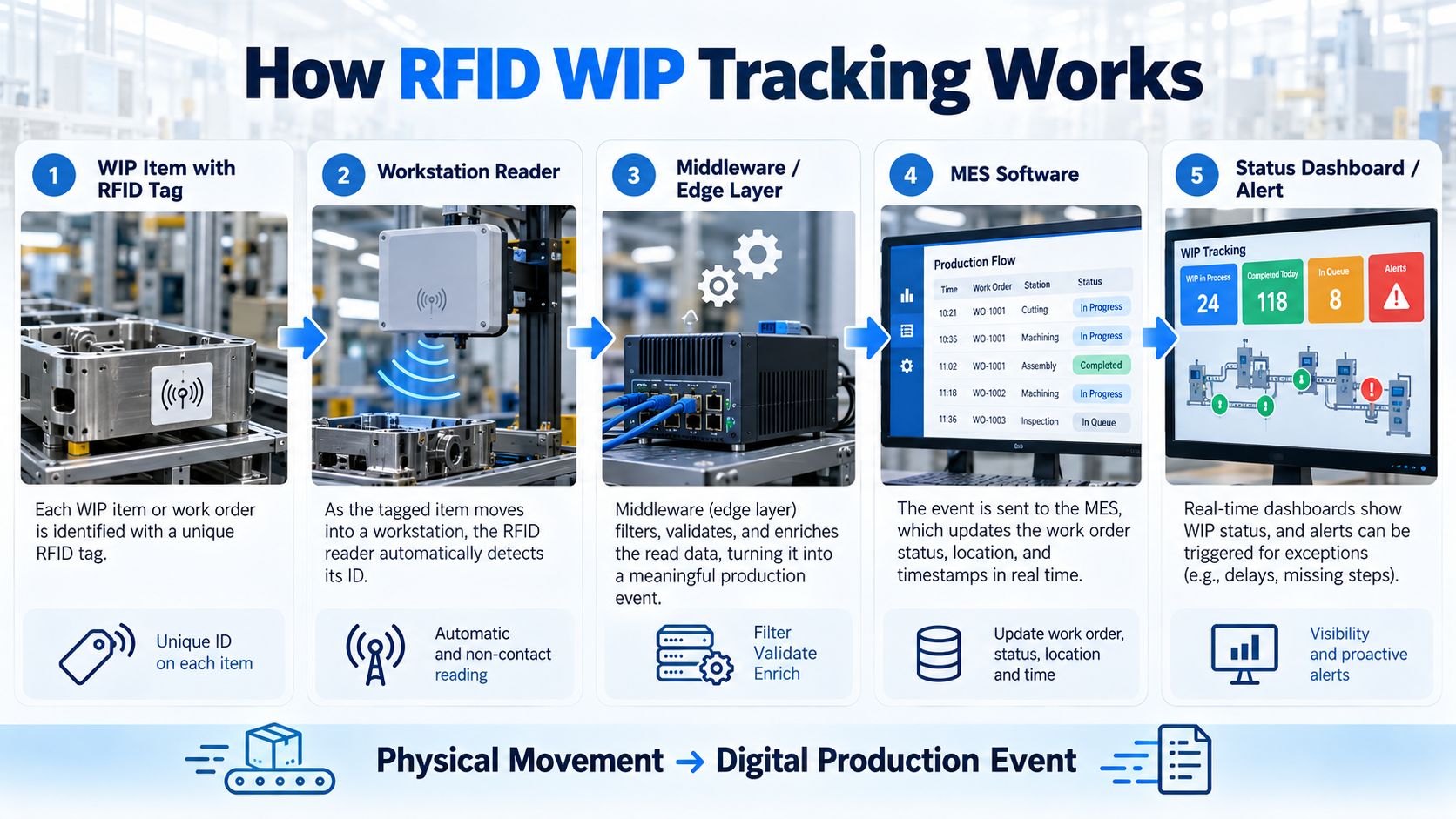
A practical RFID WIP system contains several layers.
The RFID tag may identify:
Readers are installed where useful physical events occur.
Examples include:
Middleware converts raw reader observations into controlled application events.
Instead of sending:
Reader 05 detected EPC E280...
directly into the MES, the middleware may generate:
WO-1048 arrived at Machining Station 3 at 10:42.
The Manufacturing Execution System manages:
Managers can then see:
This transforms:
Physical Movement
into:
Digital Production Events
A useful WIP system normally tracks four dimensions.
Which physical job or item is this?
Examples:
Where in the production process was it detected?
Examples:
What production state should the system assign?
Examples:
When did the event occur?
This allows the system to calculate:
Those timestamps become extremely valuable for process analysis later.
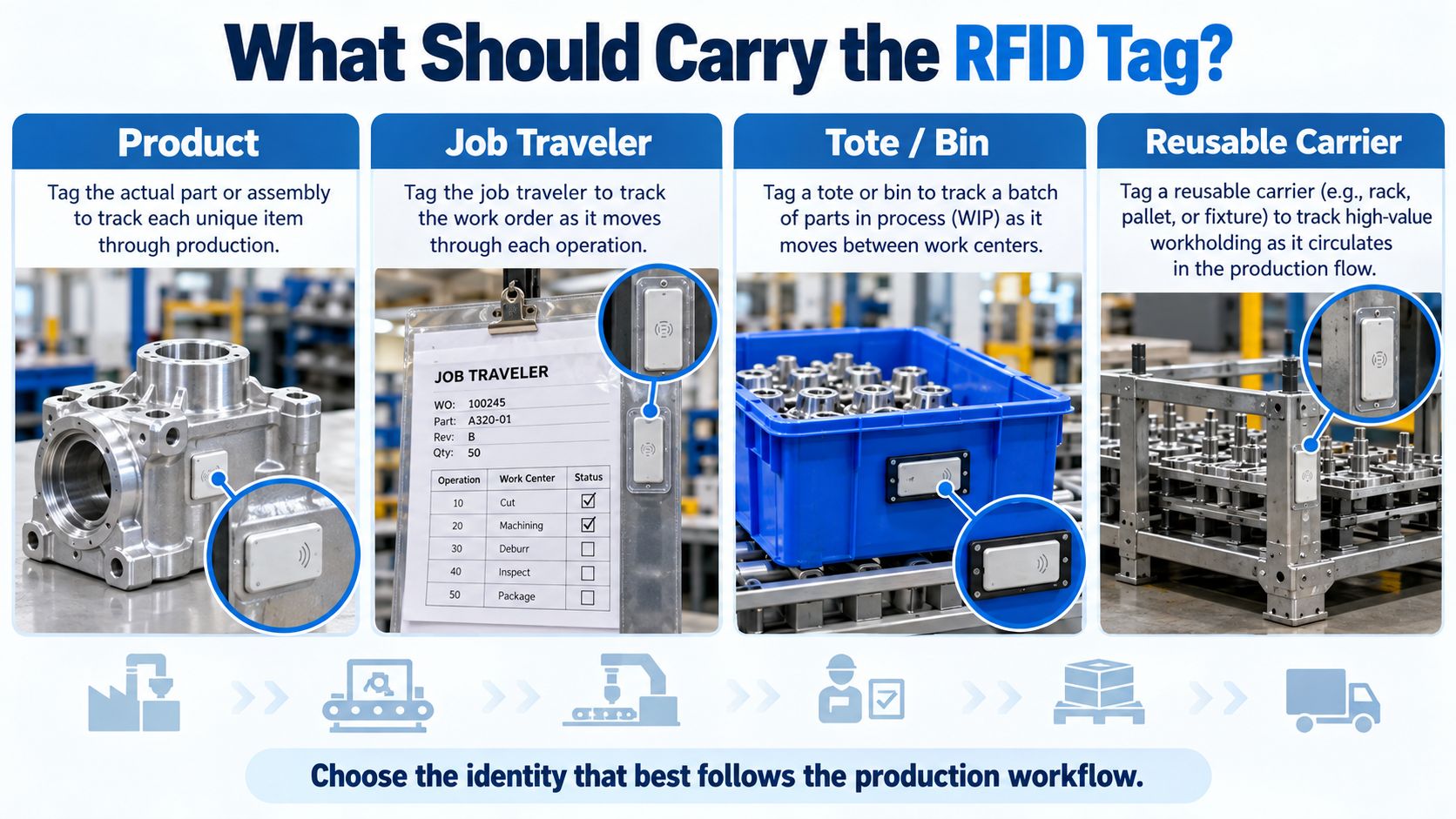
This is one of the most important WIP design decisions.
You do not always need to put the RFID tag directly on the product.
| RFID Identity | Typical Best Fit |
|---|---|
| Product / Assembly | Serialized or high-value product |
| Job Traveler | Work-order-centric manufacturing |
| Tote / Bin | Batches or loose components |
| Pallet / Cart | Larger WIP lots |
| Reusable Carrier | Automated production and workholding |
The RFID tag stays with the actual:
This can work well when:
Example:
Housing SN-10284
→ RFID Tag
→ Machining
→ Inspection
→ Assembly
→ Finished Product
The physical item and digital identity remain directly connected.
In many factories, a physical job traveler already follows the order through production.
The RFID tag can be attached to that document instead.
Architecture:
Job Traveler WO-1048
→ RFID Label
→ Production Departments
→ Completion
This is particularly useful when:
This is not theoretical. Boyd uses RAIN RFID labels on physical job tickets to track work orders through production, while Curtiss-Wright's WIP deployment similarly attaches RFID labels to job travelers.
Another common architecture is:
Reusable Carrier
→ Persistent RFID Tag
while software temporarily associates that carrier with:
Work Order / Batch / Product
Example:
Carrier C021
↔
WO-1058
After production finishes:
Association closed.
Later:
Carrier C021
↔
WO-1094
This model can work particularly well when components already travel through production in:
Balluff specifically describes RFID tags mounted on workpiece carriers or products so individual parts and production steps can be continuously monitored at workstations.
For reusable tote architecture, see:
Some high-value manufacturing processes may identify both.
For example:
Serialized Product
Reusable Fixture
The system can confirm:
Is the correct product mounted in the correct fixture?
This can support:
However, dual tagging increases system complexity and should solve a real requirement.
This distinction is fundamental.
A reusable carrier has:
Persistent Carrier Identity
while the product association may be temporary.
For example:
Carrier C1008
Monday:
→ Product A
Tuesday:
→ Product B
Wednesday:
→ Product C
RFID does not need to permanently encode every product assignment into the carrier tag.
Software can manage those relationships.
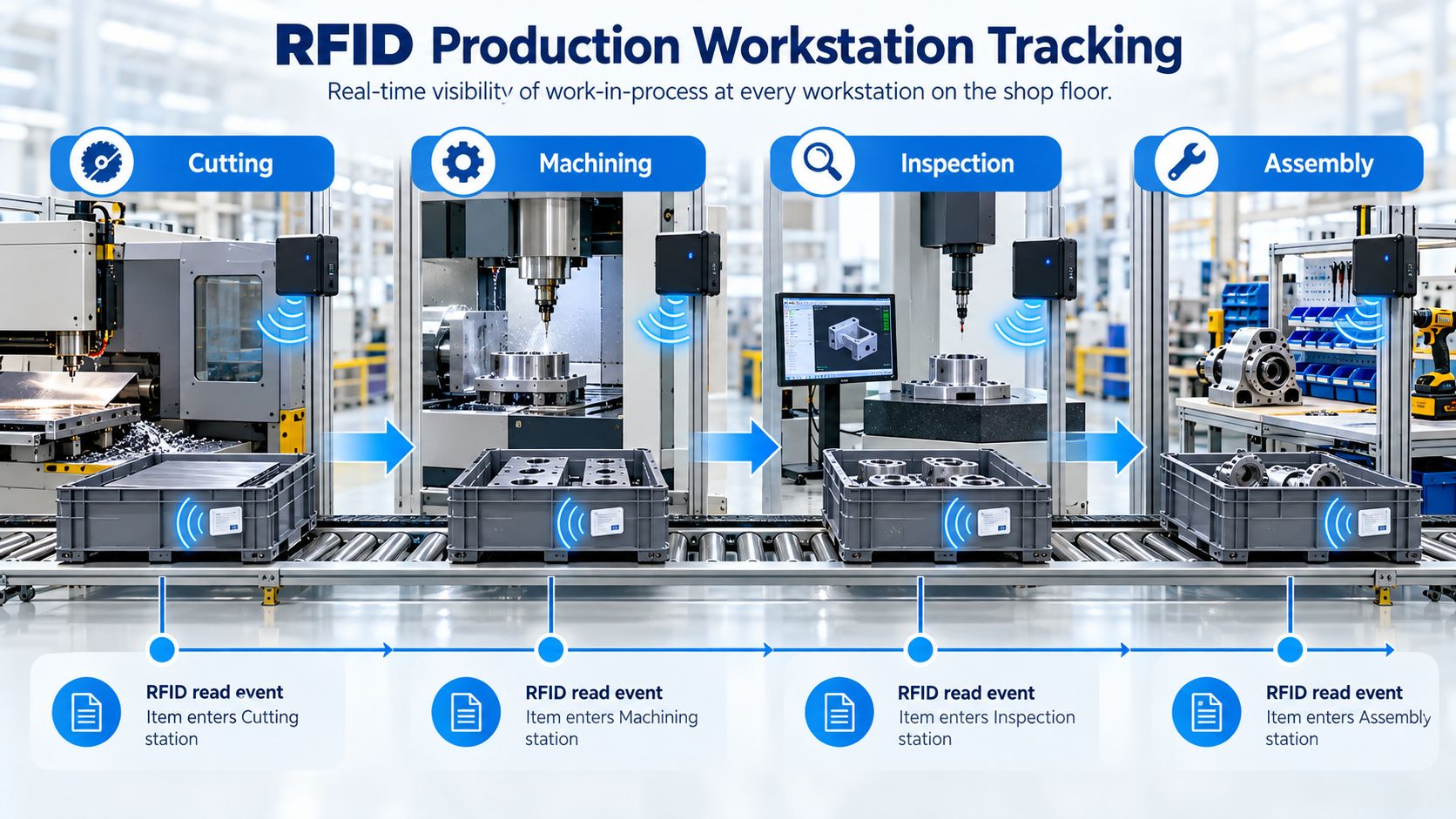
WIP visibility becomes most valuable when RFID reads correspond to meaningful manufacturing transitions.
Consider:
Cutting
→ Machining
→ Inspection
→ Assembly
Each important workstation or department can act as a read point.
RFID detects the job.
System creates:
ARRIVED_AT_CUTTING
Production system records:
CUTTING_COMPLETED
RFID detects:
ARRIVED_AT_MACHINING
The order is identified and inspection result is associated with the correct job.
MES verifies that all required upstream processes are complete.
This model allows the production system to follow the physical order instead of relying entirely on workers to manually update status.
Industrial RFID is already used this way on automated assembly lines: RFID read/write heads at workstations identify workpiece carriers and allow individual assembly steps to be monitored.
Raw RFID reads should normally be translated into production events.
Useful events may include:
ARRIVED_AT_STATION
PROCESS_STARTED
PROCESS_COMPLETED
QUALITY_PASSED
QUALITY_FAILED
MOVED_TO_REWORK
REWORK_COMPLETED
LEFT_STATION
PRODUCTION_COMPLETE
This creates a cleaner manufacturing architecture.
For example:
Raw RFID
EPC:
E2801160...
Reader:
MACHINING-03
Timestamp:
10:42:15
becomes:
Production Event
Work Order:
WO-1048
Event:
ARRIVED_AT_MACHINING
Station:
CNC-03
Time:
10:42
The MES needs the production event, not an uncontrolled stream of duplicate RFID observations.
Not every product follows the same manufacturing route.
For example:
Cutting
→ Machining
→ Painting
→ Assembly
Cutting
→ Machining
→ Heat Treatment
→ Inspection
→ Assembly
RFID identifies the current WIP.
MES retrieves:
Then the software determines:
Is this item allowed to enter this workstation?
RFID therefore supports routing by creating reliable physical events.
It does not independently decide the process plan.
Suppose an assembly requires heat treatment first.
MES record:
Heat Treatment:
Not Completed
But the RFID system detects the WIP at:
Final Assembly
The system can generate:
HOLD
instead of allowing production to continue silently.
The logic is:
RFID
→ This item arrived here.
MES
→ This item is not allowed here yet.
This distinction matters.
RFID provides physical identification.
MES provides manufacturing logic.
Quality inspection is another natural WIP checkpoint.
A workflow can be:
WIP Arrives
→ RFID identifies job
→ Inspection record loaded
→ Technician performs inspection
→ PASS / FAIL
The quality result can then remain associated with:
This creates stronger production traceability than keeping independent paper inspection records.
Current manufacturing WIP systems also use production visibility to support quality control and identify issues earlier in the process.
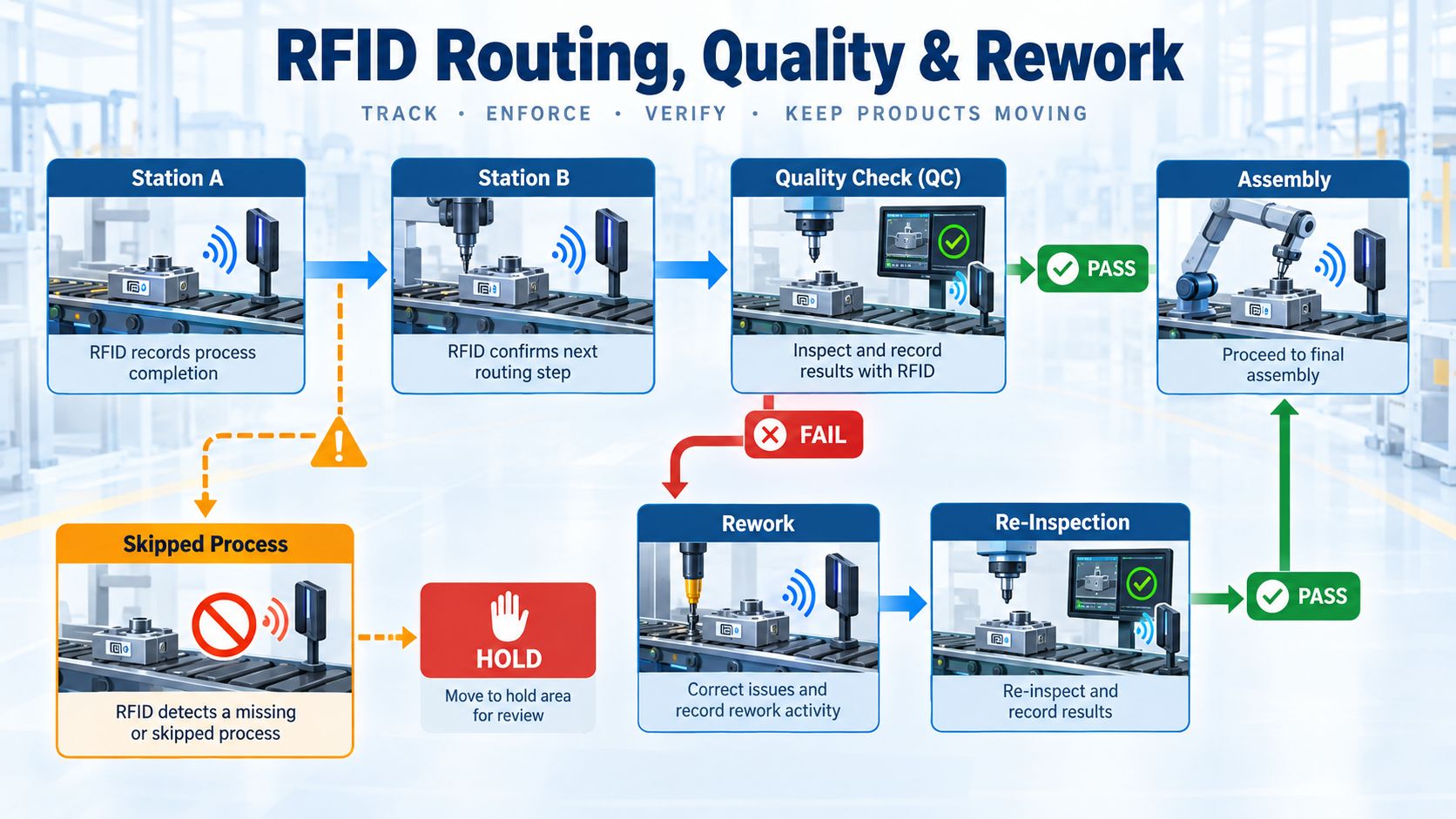
Manufacturing does not always follow:
Station A → B → C → Finished
Real production includes exceptions.
For example:
Machining
→ Inspection
→ FAIL
→ Rework
→ Re-Inspection
→ PASS
→ Assembly
A useful WIP system must represent those exception routes correctly.
A failed quality inspection can create:
QUALITY_FAILED
MES then changes the order status:
REWORK_REQUIRED
When RFID detects the item at the rework station:
ARRIVED_AT_REWORK
After correction:
REWORK_COMPLETED
Then the item returns to inspection.
This creates a traceable record showing:
Without a structured rework state, WIP can become difficult to interpret.
A work order may appear:
delayed
when it is actually:
intentionally in rework.
The system should distinguish:
RFID provides the physical visibility needed to support those states.
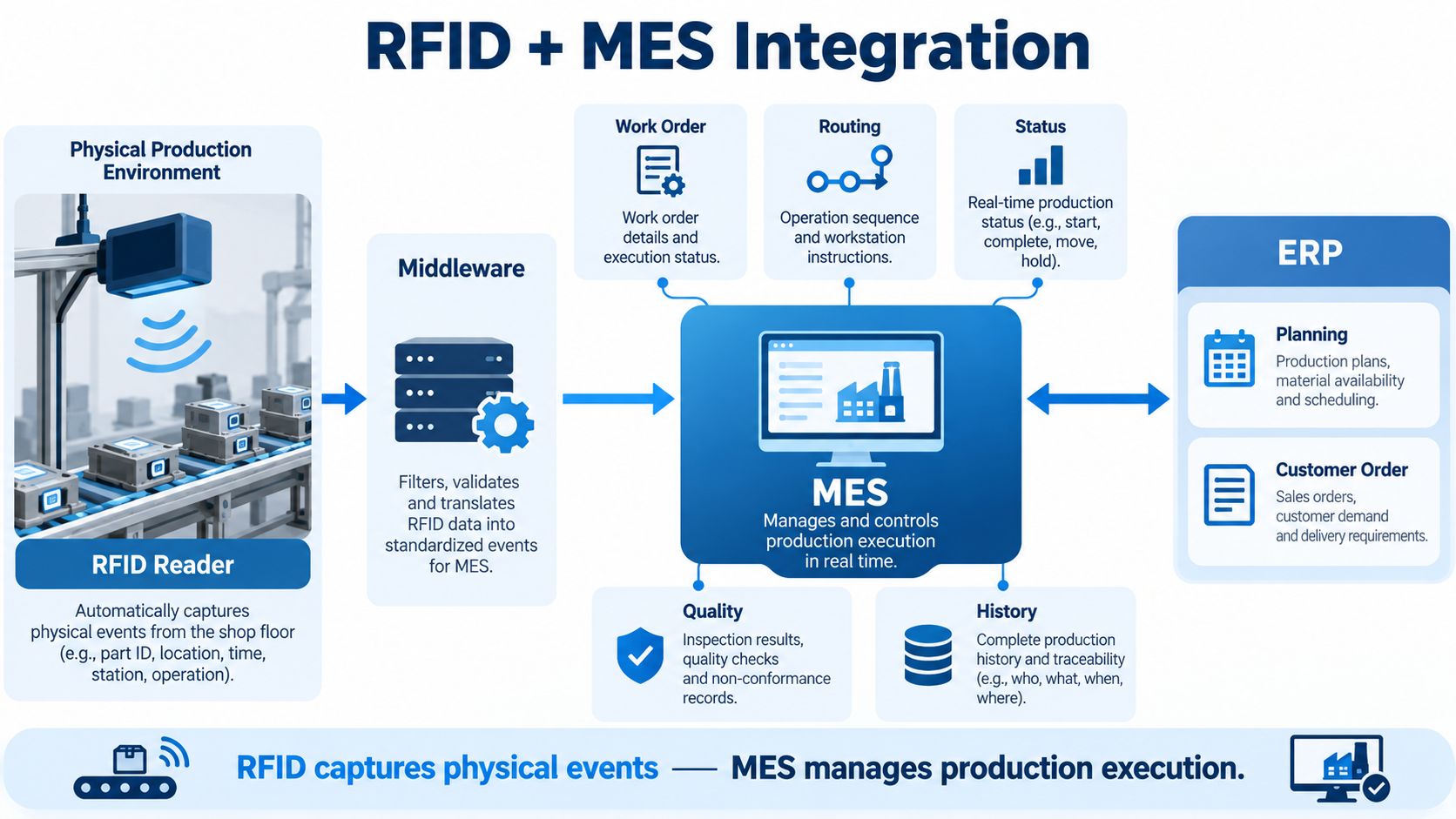
RFID WIP tracking becomes much more powerful when integrated with MES.
The architecture can be:
RFID Reader
→ Middleware
→ MES
↔ ERP
Each layer has a different responsibility.
Captures physical events such as:
Handles:
Manages production execution:
Typically handles higher-level processes such as:
A useful way to think about the layers is:
ERP
→ What are we planning to produce?
MES
→ What is happening in production?
RFID
→ What physical item was detected at this location and time?
RFID should strengthen the MES data layer rather than attempt to replace MES.
Some smaller operations may integrate RFID events directly with:
That is possible.
However, the architectural principle remains the same:
Physical Read
→ Controlled Business Event
→ Production Application
Do not send uncontrolled raw tag reads directly into business tables without:
A common question is:
Should we store the entire work order on the RFID tag?
Usually, this is unnecessary.
A common architecture is:
RFID Tag
→ Unique ID
↓
Backend
→ Work Order
→ Product
→ Routing
→ Status
→ QC History
→ Rework
→ Production History
This "license plate" approach keeps the RFID tag relatively simple.
Production status changes constantly.
Updating MES is usually easier than rewriting tags at every event.
MES databases can hold far more information than typical RFID tag memory.
The same identity can connect with:
Sensitive production information remains in controlled enterprise systems.
There are exceptions.
Industrial RFID systems may deliberately write process information to a reusable RFID data carrier.
This can be useful when:
Therefore, the correct rule is not:
Never store WIP data on the tag.
It is:
Use backend identity mapping by default, and use local tag memory when the manufacturing architecture creates a clear benefit.
Not every manufacturing WIP project should automatically use UHF.
Strong for:
This is where Syncotek's UHF hardware is particularly relevant.
HF can be attractive when:
Balluff's automated WIP architecture, for example, emphasizes RFID data carriers on workpiece carriers and readers at individual stations for highly controlled process monitoring.
The frequency should follow the required read zone.
Not the other way around.
Barcode remains a strong manufacturing technology.
| Requirement | Barcode | RFID |
|---|---|---|
| Hardware cost | Lower | Higher |
| Optical line of sight | Required | Usually not required |
| Deliberate operator confirmation | Strong | Can be reduced |
| Automatic workstation event | Requires scanner/action | Strong |
| Multiple WIP items | Individual scanning | Multiple reads possible |
| Hidden label | Difficult | Potentially readable |
| Metal environment | Visual barcode unaffected | Requires RF engineering |
| Integration | Straightforward | More RF/system design |
If:
barcode may be enough.
RFID becomes more attractive when:
Many factories can also use:
RFID + Barcode
rather than treating them as mutually exclusive.
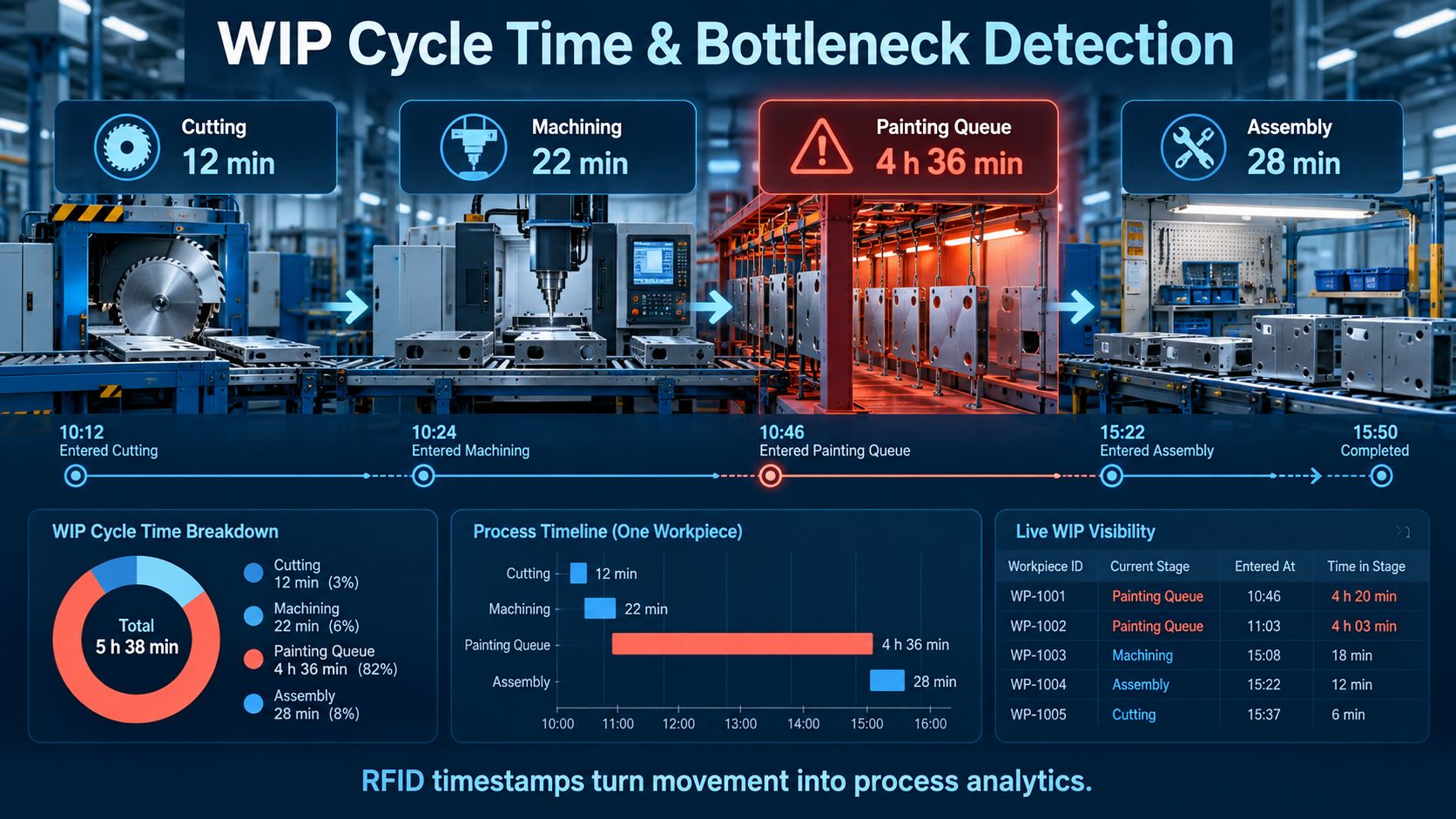
Once RFID events include timestamps, WIP tracking becomes a process analytics tool.
Consider:
Cutting:
12 min
Machining:
22 min
Painting Queue:
4 h 36 min
Assembly:
28 min
The largest delay is not machining.
It is waiting before painting.
Without physical event data, management may only see:
The order took too long.
With RFID timestamps, the system can see:
The order spent 4 hours and 36 minutes waiting in the painting queue.
That is far more actionable.
Total time from:
Production Start
to:
Production Complete
Time actively spent in an operation.
Time waiting before the next process.
How long WIP remained within a department or controlled area.
Depending on the production model, this may include a broader interval from order release to completion.
RFID does not calculate these metrics by itself.
It supplies timestamps that allow manufacturing software to calculate them.
If the system knows current WIP by process area, it can identify accumulation.
For example:
Cutting:
4 work orders
Machining:
8
Painting:
31
Assembly:
6
This suggests the painting area may deserve investigation.
A dashboard can also surface:
Commercial WIP implementations use exactly this kind of visibility to identify aging orders, bottlenecks and production delays. Zebra's Curtiss-Wright case specifically reports dashboards and alerts for aging, delayed and expedited work orders.
WIP should not be judged only by count.
Age matters.
For example:
WO-1023
Time in Stage:
1 h 10 min
WO-1050
Time in Stage:
7 h 15 min
WO-1082
Time in Stage:
18 h 40 min
This allows production supervisors to prioritize orders that are becoming stuck.
RFID can also support priority production.
For example:
Customer urgently needs:
WO-2008
MES marks:
PRIORITY = HOT
As the physical job moves through the plant, operators and managers can identify it quickly.
This is much better than relying on:
A useful example is Curtiss-Wright's RFID WIP deployment.
According to Zebra, the project used:
The company reported reducing order processing time from seven days to 24 hours and WIP inventory by 90% in that specific implementation.
These figures are a specific customer result, not a general promise for every RFID project.
The important takeaway is the architecture:
Tagged Work Orders
→ Automatic Visibility
→ Operational Alerts
→ Process Improvement
Not every WIP project needs fixed readers at every station.
Another model uses handheld RAIN RFID.
Boyd's aerospace manufacturing deployment attaches RFID labels to physical job tickets and uses handheld readers to locate work orders throughout the factory.
This is useful where the main problem is:
We spend too much time looking for jobs.
rather than:
Every workstation needs an automatic production event.
A handheld reader can provide a lower-infrastructure starting point.
Strong for:
Strong for:
Useful for:
Useful when an OEM manufacturer is building RFID directly into:
The reader architecture should follow the process event.
Good read locations are normally places where a business event naturally occurs.
Examples:
Avoid installing readers everywhere merely because it is possible.
Each reader should answer:
What useful event does this read point create?
Manufacturing read zones usually need to be controlled.
For example:
Reader at:
Station A
should identify:
Station A WIP
not:
Important variables include:
Maximum read distance is often not the goal.
Correct process-zone detection is the goal.
For deeper troubleshooting, see:
RFID Interference Troubleshooting
Factories frequently contain:
If the RFID tag is mounted directly on the metal product, an appropriate:
On-Metal RFID Tag
may be required.
However, if the RFID identity is attached to:
a different tag may be more appropriate.
Tag selection therefore depends on what is actually being identified.
See:
How to Choose the Right RFID Tag
and:
This term should be used carefully.
Can provide:
near-real-time process-stage visibility
because events are captured automatically as WIP moves.
Provides:
on-demand visibility
when employees scan or search.
Provide:
last-seen / stage visibility
at selected process transitions.
This is useful production visibility.
But it is not automatically:
continuous XYZ coordinates for every workpiece.
If exact continuous location is required, a dedicated RTLS architecture may be necessary.
WIP architectures vary by industry.
Common identities include:
Strong use cases include:
Potential tracking units include:
Often suitable for:
Potential priorities include:
The tagging architecture should reflect the industry's actual production unit.
This deserves repeating.
An RFID reader cannot independently manage:
That remains the role of:
RFID provides a stronger connection between those digital systems and physical manufacturing execution.
Do not begin by installing readers at every workstation in the factory.
A focused pilot is usually more useful.
Example pilot:
1 Product Family
1 Production Route
3–5 Stations
100–500 Work Orders / WIP Items
Examples:
Choose:
For example:
Only install readers where useful events occur.
Map RFID identities to:
Run real WIP through the route.
Include:
Compare with the original process.
Useful metrics include:
Avoid setting arbitrary targets without baseline production data.
Know what production events matter first.
Track the identity that actually follows the workflow.
Carrier ID and product identity may be different.
Start with meaningful transitions.
This may create overlapping workstation reads.
Translate reads into business events.
Real manufacturing includes exceptions.
Physical movement should be validated against routing.
Checkpoint and process-stage visibility are different from continuous coordinates.
Use backend systems unless local tag memory solves a specific requirement.
Production environments require real RF testing.
A technically correct system can still fail if it makes the manufacturing workflow harder.
Before full deployment, confirm:
RFID WIP tracking uses RFID identities and readers to capture the physical movement and status of work orders, products, carriers or job travelers as they move through manufacturing.
WIP means Work in Progress or Work in Process: material or products that have entered production but are not yet finished goods.
A tag identifies the WIP object or associated work order. Readers at production areas detect that identity, and software converts the read into a process event such as arrival, completion or inspection.
Depending on the workflow, the tag can be attached to the product, job traveler, tote, pallet or reusable workpiece carrier.
Tag the identity that best follows the production process. Serialized high-value products may justify direct tagging, while job travelers may be easier in job-shop manufacturing.
Yes. Software can associate the reusable tote or carrier with the current batch or work order.
Yes. Readers installed at useful production transitions can create stage events as WIP enters or leaves departments and workstations.
RFID can detect that an item arrived at a particular station. MES routing logic can then determine whether required previous operations were completed.
RFID readers generate physical observations, middleware converts those into controlled business events, and MES uses those events to update production status, routing, quality and history.
No. RFID is a physical data-capture layer. MES remains responsible for production execution logic.
Often only a unique identifier is required, with detailed work-order and production information stored in MES. Some industrial carrier systems may use tag memory for local process data.
Yes. The MES can associate RFID movement with failed inspection, rework, re-inspection and final disposition.
Yes. RFID timestamps can reveal how much WIP is present at different process areas and how long orders remain there.
RFID provides timestamps for production events. Manufacturing software can use those events to calculate cycle and dwell time.
Barcode is lower cost and useful when deliberate individual scanning is acceptable. RFID is attractive when automatic events, non-line-of-sight identification and faster WIP inventory create value.
UHF is strong for longer read zones, transitions and bulk visibility. HF may be attractive for tightly controlled close-range workpiece-carrier applications.
Fixed-reader networks can provide timely process-stage visibility. Handheld systems provide on-demand visibility. Neither should automatically be described as precise continuous RTLS.
If the tag is mounted directly on metal, use an appropriate on-metal RFID tag and validate it on the actual workpiece.
Install them where a physical read creates a useful production event, such as line entrances, work centers, inspection points and process transitions.
Start with one product family, a short production route and a limited number of workstations. Test both normal production and exceptions before scaling.
Compare project cost with measurable improvements such as reduced search time, fewer manual scans, lower WIP inventory, shorter cycle time, fewer missed process steps and better on-time completion.
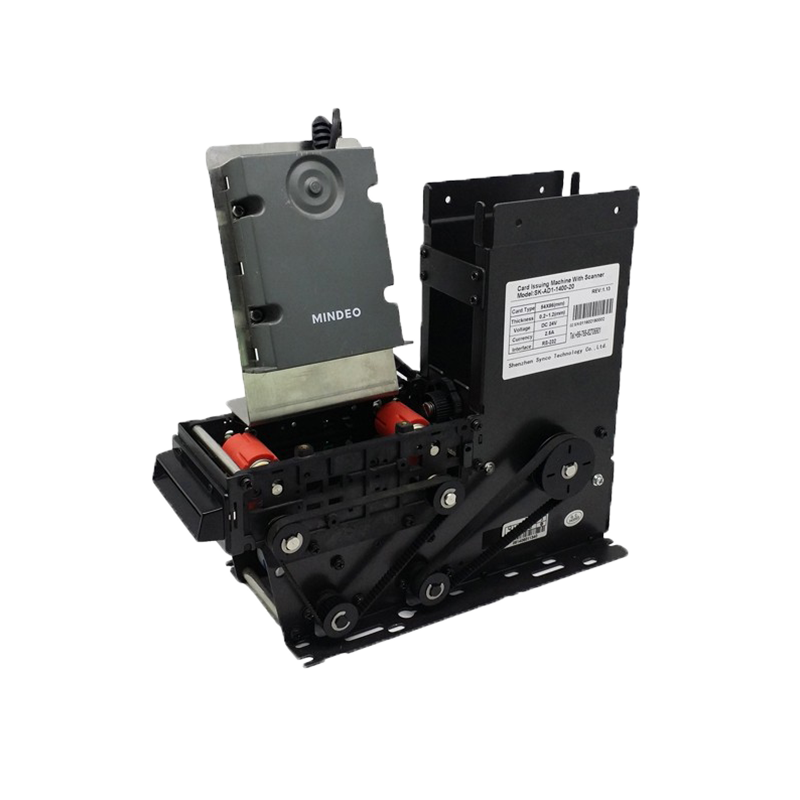
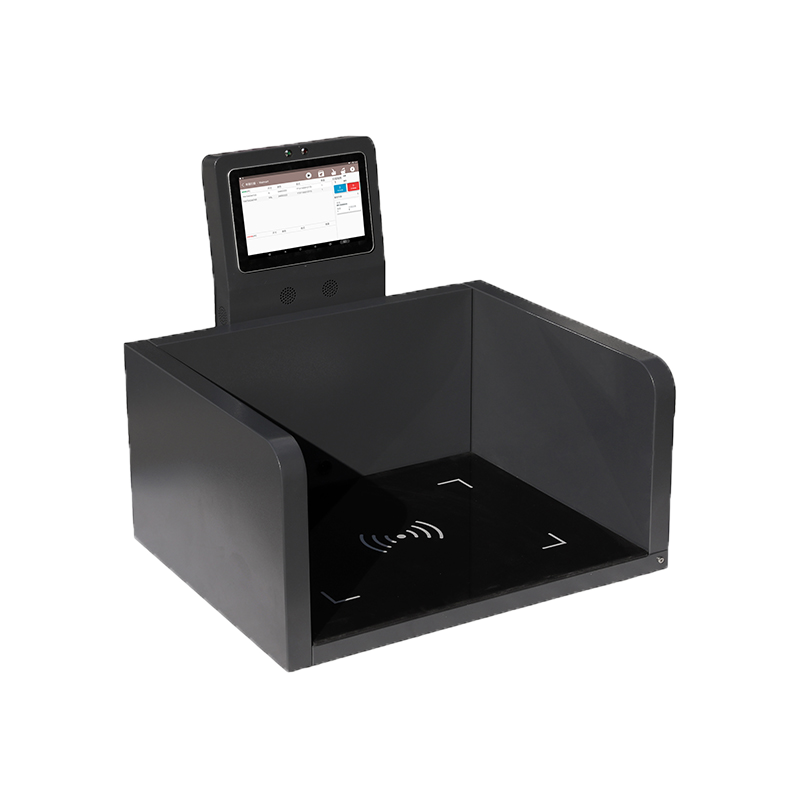
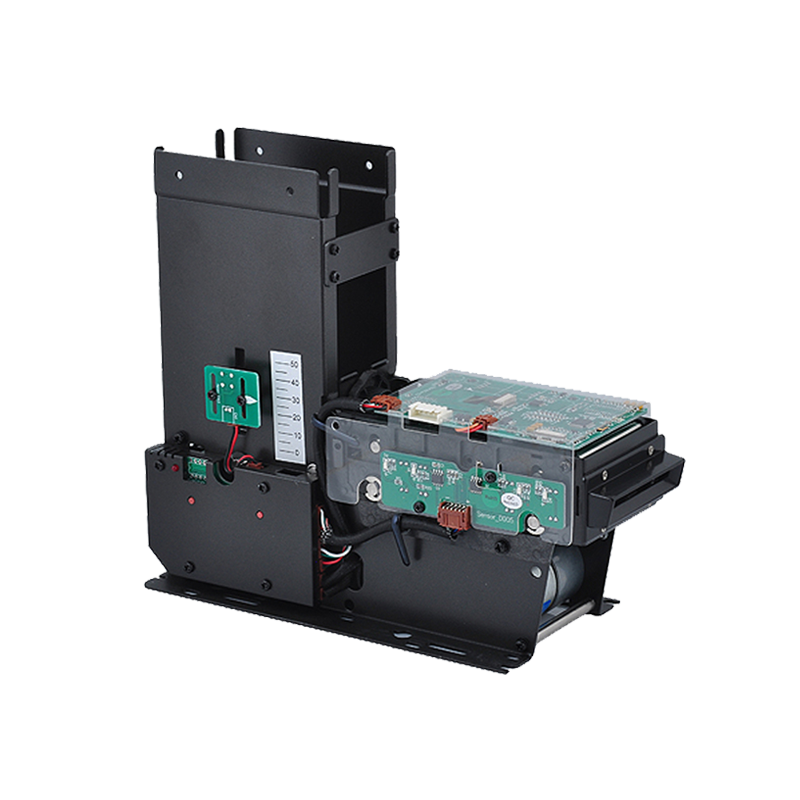
Syncotek provides passive UHF RFID hardware for manufacturing automation, production tracking and MES-integrated identification projects.
Our RFID hardware portfolio includes:
A manufacturing WIP architecture may use:
RFID Tag / Carrier
Fixed Reader
at production transitions.
OEM automation equipment may instead use:
Embedded UHF Module
inside:
Handheld readers can support:
Syncotek supplies the RFID identification and data-capture layer.
The customer's MES or production application remains responsible for:
For an RFID WIP pilot, useful information includes:
For example:
Tracking Object: Plastic Workpiece Carrier
Workstations: 6
Route: Machining → Washing → Inspection → Assembly
Read Type: Automatic Fixed Reader
MES: Existing
Carrier Quantity: 800
Pilot Quantity: 100
From this information, the appropriate tag, reader, antenna and read-zone architecture can be narrowed for sample validation.
Continue with:
How to Choose a UHF RFID Fixed Reader
How to Choose the Right RFID Tag
RFID Interference Troubleshooting
The goal of RFID WIP tracking is not simply to know that a tag was read.
It is to create a reliable connection between physical production movement and digital manufacturing execution, so every work order, process transition, delay, quality event and rework cycle becomes easier to see and manage.
 Knowledge
A successful RFID project should not begin by purchasing readers. It should begin with a business problem. Companies often approach RFID projects with a requirement such as: We want to use RFID in our warehouse. That is not yet an RFID requirement. A much more useful project definition would be: We need to verify whether […]
READ MORE Knowledge
To read RFID means to use an RFID reader to detect a tag and retrieve data stored on it (an ID, EPC, UID, or user memory). With passive tags, the reader also provides the RF energy the tag needs to respond. The “how” depends on the RFID type: NFC / HF (13.56 MHz): very short-range […]
READ MORE Knowledge
When businesses start planning an RFID project, they often focus on readers, antennas, and software first. However, one of the most important decisions is the RFID item attached to the object being tracked. This is where terminology can become confusing. Many people use RFID inlay, RFID tag, and RFID label interchangeably. In some conversations, this may not cause a […]
READ MORE Knowledge
Industrial laundries, hospitals, hotels, uniform rental companies, nursing facilities, and textile service providers process large volumes of garments and linens every day. These textile items move continuously between customers, collection points, sorting areas, washing machines, dryers, ironing systems, storage rooms, and distribution vehicles. Without reliable identification, it can be difficult to know how many items […]
READ MORE Knowledge
A modern data center may contain thousands of physical IT assets distributed across: rooms cages rows racks storage areas staging zones repair areas multiple facilities Servers, switches, storage appliances and network equipment are also moved, upgraded, replaced and decommissioned throughout their lifecycle. The challenge is not simply knowing how many devices the organization purchased. Data […]
READ MOREIf you are interested in our services or need customized solutions, please feel free to contact us.