
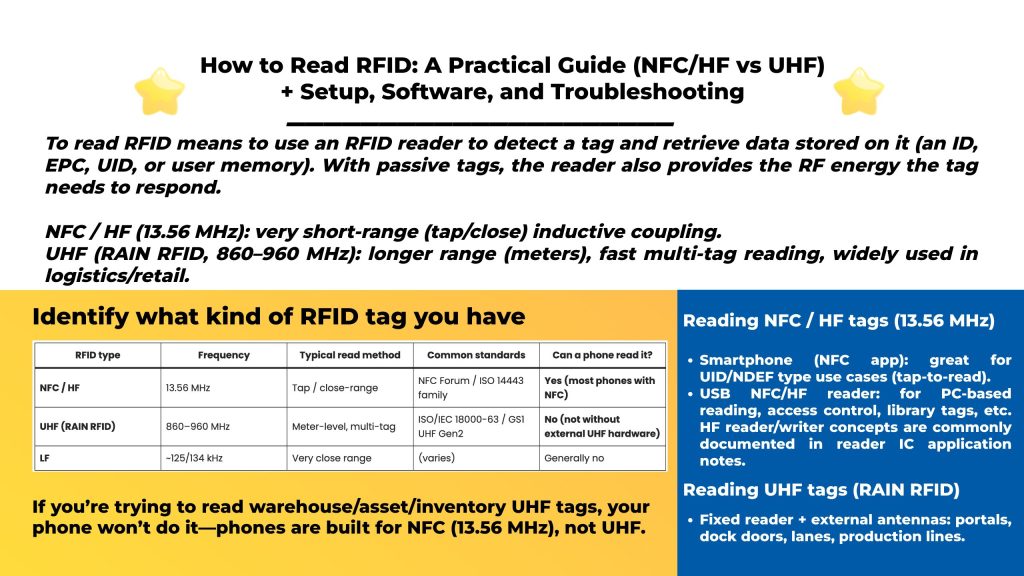
To read RFID means to use an RFID reader to detect a tag and retrieve data stored on it (an ID, EPC, UID, or user memory). With passive tags, the reader also provides the RF energy the tag needs to respond.
The “how” depends on the RFID type:
Most reading failures happen because people try the wrong frequency.
| RFID type | Frequency | Typical read method | Common standards | Can a phone read it? |
|---|---|---|---|---|
| NFC / HF | 13.56 MHz | Tap / close-range | NFC Forum / ISO 14443 family | Yes (most phones with NFC) |
| UHF (RAIN RFID) | 860–960 MHz | Meter-level, multi-tag | ISO/IEC 18000-63 / GS1 UHF Gen2 | No (not without external UHF hardware) |
| LF | ~125/134 kHz | Very close range | (varies) | Generally no |
Fast rule:
If you’re trying to read warehouse/asset/inventory UHF tags, your phone won’t do it—phones are built for NFC (13.56 MHz), not UHF.
Options:
Options:
If you’re reading UHF, your “reader” is a system:
UHF must match your region plan (EU vs US vs others). RAIN systems are standards-based around ISO/IEC 18000-63; region settings ensure legal operation.
“Reading RFID” is usually done via:
GS1 describes the EPC “Gen2” air interface and protocol ecosystem used by UHF tags/readers.
Best practice for first test:
Start with a vendor tool → confirm tags are being seen → then move to SDK/LLRP once RF basics are stable.
Most UHF tags expose memory “banks” such as:
These concepts are defined in the Gen2 protocol standard.
Common reads include:
NFC operates at 13.56 MHz and supports short-range tag reading in reader/writer mode.
Readers may output the same tag many times per second. Real deployments usually add a “filter layer” that:
This is exactly why EPCIS exists as a standard to share “what happened, where, when” event data in supply chains.
Likely it’s UHF, not NFC. Phones generally read NFC (13.56 MHz) only; UHF needs an external UHF reader.
Typical causes:
Warehouse environments are RF-chaotic. Fix by:
If your goal is reading UHF tags in real workflows (fixed portals, integrated zones, handheld inventory), Syncotek’s RFID catalog covers UHF integrated readers, UHF fixed readers, handheld RFID devices, antennas, and tags.
Example fixed reader product pages also highlight multi-interface/multi-OS development support for integration projects.
You can read NFC/HF (13.56 MHz) tags with NFC-enabled phones at very short range, but not typical UHF inventory tags without external UHF hardware.
Use a UHF reader + proper antenna, start with vendor demo software, then integrate via SDK/LLRP when your read zone is stable. UHF RAIN systems are based on ISO/IEC 18000-63 / GS1 UHF Gen2.
UHF Gen2 systems support anti-collision inventory so readers can identify many tags in the field efficiently (implementation details live in the Gen2 protocol).
 Uncategorized
RFID is no longer limited to experimental pilots or isolated warehouse projects. Large companies now use RFID to connect physical products, packages, credentials, vehicles, and customer interactions with digital business systems. Depending on the application, RFID can help a company identify an item, confirm its location, validate access, automate inventory counting, track movement, or trigger […]
READ MORE Knowledge
Digital Product Passports are changing the way manufacturers, brands, supply-chain operators, retailers, repairers, recyclers, and regulators think about product information. Instead of product data remaining fragmented across ERP systems, spreadsheets, certificates, technical documents, service records, and recycling databases, a Digital Product Passport can connect a physical product with structured digital information that remains accessible throughout […]
READ MORE Knowledge
What are LLRP, ALE, and EPCIS (in one minute)? These three GS1/EPCglobal standards cover different layers of an RFID solution: LLRP (Low Level Reader Protocol): a low-level protocol between software and an RFID reader that provides fine control of a single reader. ALE (Application Level Events): a standard interface for applications to obtain filtered, consolidated RFID capture data (i.e., […]
READ MORE Knowledge
The RFID system auto-identifies vehicles' weight, calculates net weight, and provides real-time monitoring for optimized efficiency.
READ MORE Knowledge
UHF RFID systems use radio waves to communicate between readers, antennas, and passive RFID tags. In a small installation with one reader, radio-frequency interference may be relatively easy to control. In a warehouse, factory, retail store, distribution center, or event venue with several readers operating at the same time, the RF environment becomes more complicated. […]
READ MOREIf you are interested in our services or need customized solutions, please feel free to contact us.