
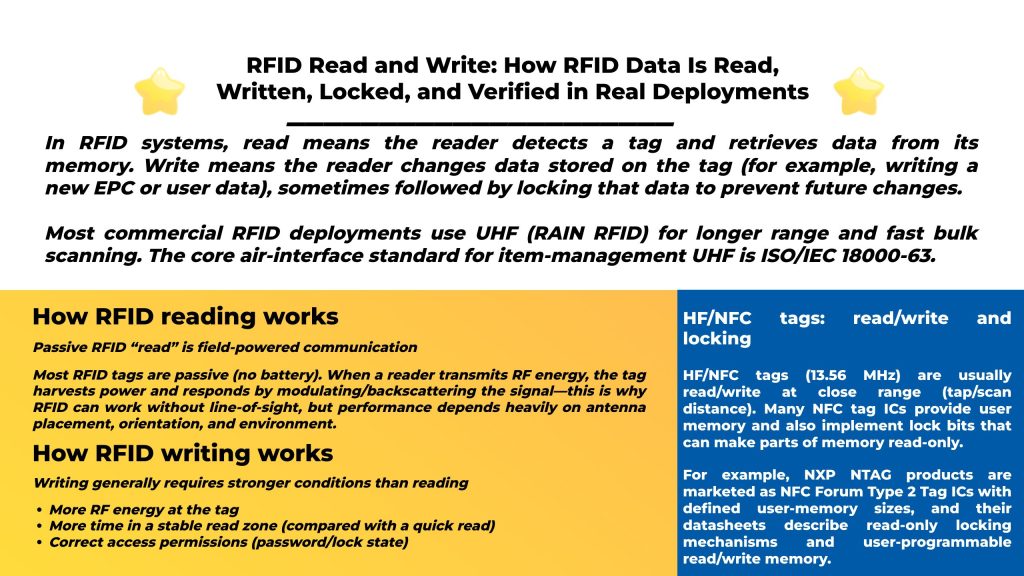
In RFID systems, read means the reader detects a tag and retrieves data from its memory. Write means the reader changes data stored on the tag (for example, writing a new EPC or user data), sometimes followed by locking that data to prevent future changes.
Most commercial RFID deployments use UHF (RAIN RFID) for longer range and fast bulk scanning. The core air-interface standard for item-management UHF is ISO/IEC 18000-63.
Most RFID tags are passive (no battery). When a reader transmits RF energy, the tag harvests power and responds by modulating/backscattering the signal—this is why RFID can work without line-of-sight, but performance depends heavily on antenna placement, orientation, and environment.
Depending on tag type and standard, read data can include:
For UHF EPC Gen2 / ISO 18000-63 tags, the protocol is defined by the GS1 Gen2 standard, which also describes memory-bank behaviors and access operations.
Realted Read: Passive RFID vs Active RFID: Differences, Pros/Cons, Use Cases & How to Choose
Writing to a passive tag usually needs:
That’s why a setup that “reads fine” may still “write poorly” until you tighten the zone (distance/orientation), reduce interference, and tune power.
Practical rule: If you must write at a distance, design your system as a controlled “encoding/commissioning station,” not a wide open portal.
UHF EPC Gen2 / ISO 18000-63 tag memory is commonly organized into banks (overview below), and write/lock behavior is standardized.
For UHF (EPC Gen2 / ISO 18000-63) tags, you’ll typically deal with:
| Memory bank | What it’s for | Read/write? | Common notes |
|---|---|---|---|
| Reserved | Access + kill passwords | RW (with rules) | Two 32-bit passwords live here |
| EPC (UII) | Main identifier (EPC) | RW | Most deployments write EPC during commissioning |
| TID | Tag Identifier | Usually RO | Often factory-programmed and locked |
| User | Optional extra data | RW (if present) | Use when you truly need offline data |
Many Gen2 tags support an Access password and Kill password, each 32-bit, stored in the Reserved bank.
Locking is typically applied per memory bank; commonly, non-reserved banks are write-lockable (and TID is often permanently locked at the factory).
Important: Only use write/lock/kill operations when you own the tags and have explicit authorization—these actions can permanently change tag behavior.
HF/NFC tags (13.56 MHz) are usually read/write at close range (tap/scan distance). Many NFC tag ICs provide user memory and also implement lock bits that can make parts of memory read-only.
For example, NXP NTAG products are marketed as NFC Forum Type 2 Tag ICs with defined user-memory sizes, and their datasheets describe read-only locking mechanisms and user-programmable read/write memory.
This is where you:
This workflow reduces errors and makes data consistent across warehouses, stores, and factories.
RFID printer-encoders often handle:
Writing “in motion” (conveyor/portal) is possible but riskier than reading because write needs stability. Most teams only do this when they can guarantee:
A production-safe process is: Write → Read back → Compare → Mark success/failure
This is how you prevent silent data corruption from weak power, collisions, or partial writes.
If you’re building systems (not just a demo), these standards map cleanly to read/write operations:
Practical takeaway:
If reads succeed but writes fail, the usual causes are:
If your goal is to deploy reliable read/write (encoding, locking, verification, portal reads, handheld inventory), it helps to choose hardware with strong SDK/protocol support and a complete portfolio.
Syncotek provides an RFID product catalog covering UHF modules, integrated readers, fixed readers, desktop readers, access gates, handhelds, antennas, and tags.
Some Syncotek reader models also highlight multi-protocol support (TCP/HTTP/UDP/Wiegand), multi-OS and multi-language SDK support, and OEM/ODM services, which is useful when integrating read/write into your own software stack.
Many RFID tags are read/write, but some are read-only or have memory areas that can be locked after writing. For UHF Gen2 tags, memory banks and lock behaviors are defined in the Gen2 ecosystem.
Most commonly: EPC/UII (the identifier). User memory may be used in specialized cases.
Writing requires more stable power/time conditions and may be blocked by locks/passwords. Locking and password location/behavior are part of Gen2 tag design.
Many are read/write and can include lock mechanisms that make memory read-only.
 Knowledge
Active RFID is a type of radio frequency identification technology that uses battery-powered tags to transmit data to RFID readers. Because the tag has its own power source, it can send signals over a much longer distance than a passive RFID tag, which relies on the reader’s signal for energy. That is why Active RFID is commonly […]
READ MORE Knowledge
The RFID system auto-identifies vehicles' weight, calculates net weight, and provides real-time monitoring for optimized efficiency.
READ MORE Knowledge
RFID (Radio Frequency Identification) is an automatic identification and data capture technology that uses radio-frequency electric or magnetic fields to transmit information. It’s used to identify and track many kinds of objects—everything from manufactured goods and assets to people and animals. RFID is popular when you need fast, automated identification (often without line-of-sight) and—especially with UHF—the ability to […]
READ MORE Knowledge
To read RFID means to use an RFID reader to detect a tag and retrieve data stored on it (an ID, EPC, UID, or user memory). With passive tags, the reader also provides the RF energy the tag needs to respond. The “how” depends on the RFID type: NFC / HF (13.56 MHz): very short-range […]
READ MORE Knowledge
HF RFID (High-Frequency Radio Frequency Identification) is a widely used RFID technology operating at 13.56 MHz. It’s best known for short-range, controlled reads, strong support for secure credentials, and the fact that NFC is built on the same HF band. If your project needs a tap / close-range user experience—like access control badges, library book tags, healthcare wristbands, or secure ID cards—HF […]
READ MOREIf you are interested in our services or need customized solutions, please feel free to contact us.